

TanStack DB Mutations
TanStack DB provides a powerful mutation system that enables optimistic updates with automatic state management. This system is built around a pattern of optimistic mutation → backend persistence → sync back → confirmed state. This creates a highly responsive user experience while maintaining data consistency and being easy to reason about.
Local changes are applied immediately as optimistic state, then persisted to your backend, and finally the optimistic state is replaced by the confirmed server state once it syncs back.
// Define a collection with a mutation handler
const todoCollection = createCollection({
  id: "todos",
  onUpdate: async ({ transaction }) => {
    const mutation = transaction.mutations[0]
    await api.todos.update(mutation.original.id, mutation.changes)
  },
})

// Apply an optimistic update
todoCollection.update(todo.id, (draft) => {
  draft.completed = true
})
This pattern extends the Redux/Flux unidirectional data flow beyond the client to include the server:
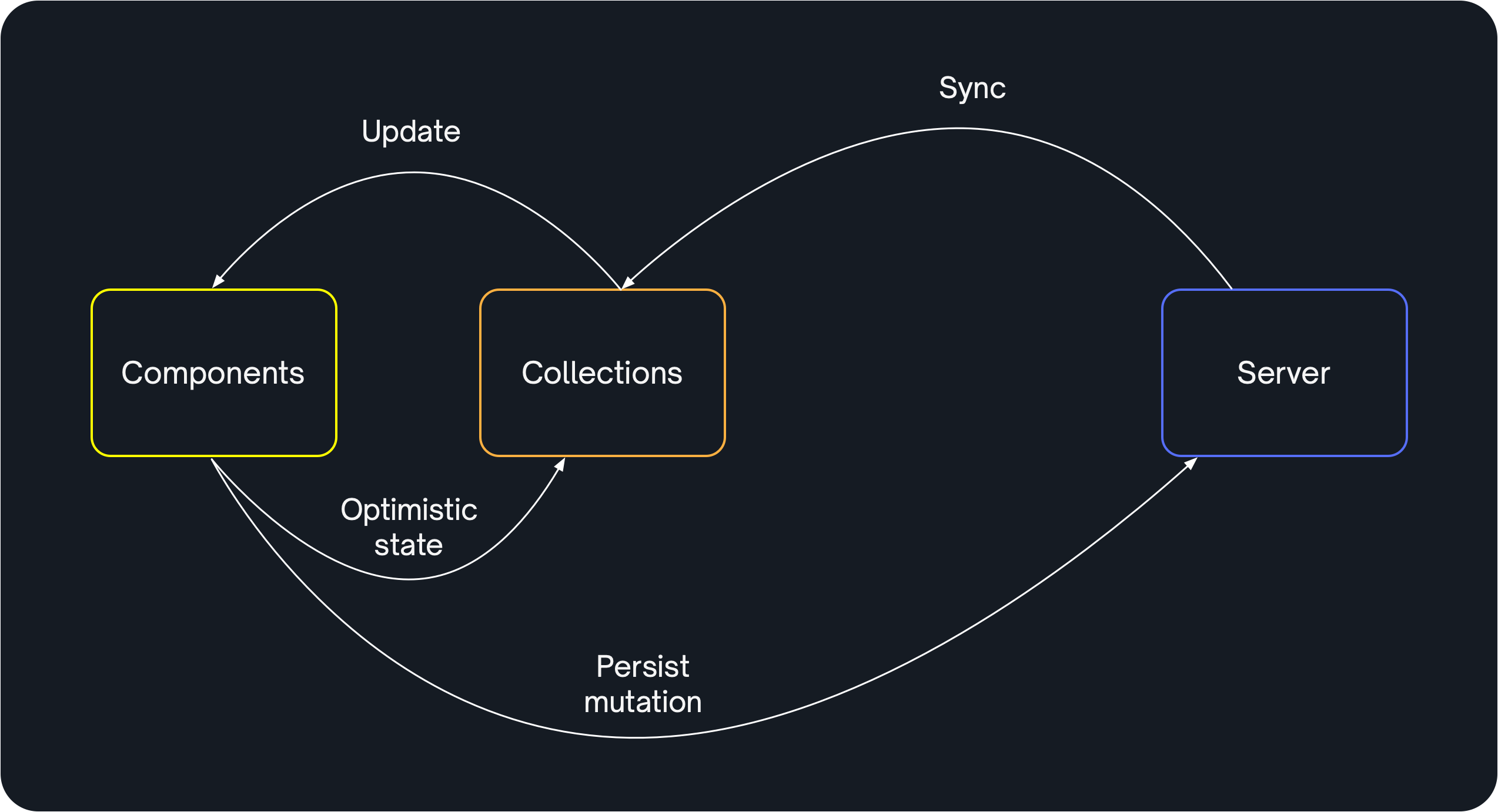
With an instant inner loop of optimistic state, superseded in time by the slower outer loop of persisting to the server and syncing the updated server state back into the collection.
Simplified Mutations vs Traditional Approaches
TanStack DB's mutation system eliminates much of the boilerplate required for optimistic updates in traditional approaches. Compare the difference:
Before (TanStack Query with manual optimistic updates):
const addTodoMutation = useMutation({
  mutationFn: async (newTodo) => api.todos.create(newTodo),
  onMutate: async (newTodo) => {
    await queryClient.cancelQueries({ queryKey: ['todos'] })
    const previousTodos = queryClient.getQueryData(['todos'])
    queryClient.setQueryData(['todos'], (old) => [...(old || []), newTodo])
    return { previousTodos }
  },
  onError: (err, newTodo, context) => {
    queryClient.setQueryData(['todos'], context.previousTodos)
  },
  onSettled: () => {
    queryClient.invalidateQueries({ queryKey: ['todos'] })
  },
})
After (TanStack DB):
const todoCollection = createCollection(
  queryCollectionOptions({
    queryKey: ['todos'],
    queryFn: async () => api.todos.getAll(),
    getKey: (item) => item.id,
    schema: todoSchema,
    onInsert: async ({ transaction }) => {
      await Promise.all(
        transaction.mutations.map((mutation) =>
          api.todos.create(mutation.modified)
        )
      )
    },
  })
)

// Simple mutation - no boilerplate!
todoCollection.insert({
  id: crypto.randomUUID(),
  text: '🔥 Make app faster',
  completed: false,
})
The benefits:
- ✅ Automatic optimistic updates
- ✅ Automatic rollback on error
- ✅ No manual cache manipulation
- ✅ Type-safe mutations
Table of Contents
- Mutation Approaches
- Mutation Lifecycle
- Collection Write Operations
- Operation Handlers
- Creating Custom Actions
- Manual Transactions
- Mutation Merging
- Controlling Optimistic Behavior
- Transaction States
- Handling Temporary IDs
Mutation Approaches
TanStack DB provides different approaches to mutations, each suited to different use cases:
Collection-Level Mutations
Collection-level mutations (insert, update, delete) are designed for direct state manipulation of a single collection. These are the simplest way to make changes and work well for straightforward CRUD operations.
// Direct state change
todoCollection.update(todoId, (draft) => {
  draft.completed = true
  draft.completedAt = new Date()
})
Use collection-level mutations when:
- You're making simple CRUD operations on a single collection
- The state changes are straightforward and match what the server will store
You can use metadata to annotate these operations and customize behavior in your handlers:
// Annotate with metadata
todoCollection.update(
  todoId,
  { metadata: { intent: 'complete' } },
  (draft) => {
    draft.completed = true
  }
)

// Use metadata in handler
onUpdate: async ({ transaction }) => {
  const mutation = transaction.mutations[0]

  if (mutation.metadata?.intent === 'complete') {
    await Promise.all(
      transaction.mutations.map((mutation) =>
        api.todos.complete(mutation.original.id)
      )
    )
  } else {
    await Promise.all(
      transaction.mutations.map((mutation) =>
        api.todos.update(mutation.original.id, mutation.changes)
      )
    )
  }
}
Intent-Based Mutations with Custom Actions
For more complex scenarios, use createOptimisticAction or createTransaction to create intent-based mutations that capture specific user actions.
// Intent: "like this post"
const likePost = createOptimisticAction<string>({
  onMutate: (postId) => {
    // Optimistic guess at the change
    postCollection.update(postId, (draft) => {
      draft.likeCount += 1
      draft.likedByMe = true
    })
  },
  mutationFn: async (postId) => {
    // Send the intent to the server
    await api.posts.like(postId)
    // Server determines actual state changes
    await postCollection.utils.refetch()
  },
})

// Use it.
likePost(postId)
Use custom actions when:
- You need to mutate multiple collections in a single transaction
- The optimistic change is a guess at how the server will transform the data
- You want to send user intent to the backend rather than exact state changes
- The server performs complex logic, calculations, or side effects
- You want a clean, reusable mutation that captures a specific operation
Custom actions provide the cleanest way to capture specific types of mutations as named operations in your application. While you can achieve similar results using metadata with collection-level mutations, custom actions make the intent explicit and keep related logic together.
When to use each:
- Collection-level mutations (
collection.update): Simple CRUD operations on a single collection createOptimisticAction: Intent-based operations, multi-collection mutations, immediately committedcreateTransaction: Fully custom transactions, delayed commits, multi-step workflows
Mutation Lifecycle
The mutation lifecycle follows a consistent pattern across all mutation types:
- Optimistic state applied: The mutation is immediately applied to the local collection as optimistic state
- Handler invoked: The appropriate handler — either
mutationFnor a Collection handler (onInsert,onUpdate, oronDelete) — is called to persist the change - Backend persistence: Your handler persists the data to your backend
- Sync back: The handler ensures server writes have synced back to the collection
- Optimistic state dropped: Once synced, the optimistic state is replaced by the confirmed server state
// Step 1: Optimistic state applied immediately
todoCollection.update(todo.id, (draft) => {
  draft.completed = true
})
// UI updates instantly with optimistic state

// Step 2-3: onUpdate handler persists to backend
// Step 4: Handler waits for sync back
// Step 5: Optimistic state replaced by server state
If the handler throws an error during persistence, the optimistic state is automatically rolled back.
Collection Write Operations
Collections support three core write operations: insert, update, and delete. Each operation applies optimistic state immediately and triggers the corresponding operation handler.
Insert
Add new items to a collection:
// Insert a single item
todoCollection.insert({
  id: "1",
  text: "Buy groceries",
  completed: false
})

// Insert multiple items
todoCollection.insert([
  { id: "1", text: "Buy groceries", completed: false },
  { id: "2", text: "Walk dog", completed: false },
])

// Insert with metadata
todoCollection.insert(
  { id: "1", text: "Custom item", completed: false },
  { metadata: { source: "import" } }
)

// Insert without optimistic updates
todoCollection.insert(
  { id: "1", text: "Server-validated item", completed: false },
  { optimistic: false }
)Returns: A Transaction object that you can use to track the mutation's lifecycle.
Update
Modify existing items using an immutable draft pattern:
// Update a single item
todoCollection.update(todo.id, (draft) => {
  draft.completed = true
})

// Update multiple items
todoCollection.update([todo1.id, todo2.id], (drafts) => {
  drafts.forEach((draft) => {
    draft.completed = true
  })
})

// Update with metadata
todoCollection.update(
  todo.id,
  { metadata: { reason: "user update" } },
  (draft) => {
    draft.text = "Updated text"
  }
)

// Update without optimistic updates
todoCollection.update(
  todo.id,
  { optimistic: false },
  (draft) => {
    draft.status = "server-validated"
  }
)Parameters:
keyorkeys: The item key(s) to updateoptions(optional): Configuration object withmetadataand/oroptimisticflagsupdater: Function that receives a draft to mutate
Returns: A Transaction object that you can use to track the mutation's lifecycle.
Important
The updater function uses an Immer-like pattern to capture changes as immutable updates. You must not reassign the draft parameter itself—only mutate its properties.
Delete
Remove items from a collection:
// Delete a single item
todoCollection.delete(todo.id)

// Delete multiple items
todoCollection.delete([todo1.id, todo2.id])

// Delete with metadata
todoCollection.delete(todo.id, {
  metadata: { reason: "completed" }
})

// Delete without optimistic updates
todoCollection.delete(todo.id, { optimistic: false })Parameters:
keyorkeys: The item key(s) to deleteoptions(optional): Configuration object withmetadataand/oroptimisticflags
Returns: A Transaction object that you can use to track the mutation's lifecycle.
Operation Handlers
Operation handlers are functions you provide when creating a collection that handle persisting mutations to your backend. Each collection can define three optional handlers: onInsert, onUpdate, and onDelete.
Handler Signature
All operation handlers receive an object with the following properties:
type OperationHandler = (params: {
  transaction: Transaction
  collection: Collection
}) => Promise<any> | any
The transaction object contains:
mutations: Array of mutation objects, each with:collection: The collection being mutatedtype: The mutation type ('insert','update', or'delete')original: The original item (for updates and deletes)modified: The modified item (for inserts and updates)changes: The changes object (for updates)key: The item keymetadata: Optional metadata attached to the mutation
Defining Operation Handlers
Define handlers when creating a collection:
const todoCollection = createCollection({
  id: "todos",
  // ... other options

  onInsert: async ({ transaction }) => {
    await Promise.all(
      transaction.mutations.map((mutation) =>
        api.todos.create(mutation.modified)
      )
    )
  },

  onUpdate: async ({ transaction }) => {
    await Promise.all(
      transaction.mutations.map((mutation) =>
        api.todos.update(mutation.original.id, mutation.changes)
      )
    )
  },

  onDelete: async ({ transaction }) => {
    await Promise.all(
      transaction.mutations.map((mutation) =>
        api.todos.delete(mutation.original.id)
      )
    )
  },
})
Important
Operation handlers must not resolve until the server changes have synced back to the collection. Different collection types provide different patterns to ensure this happens correctly.
Collection-Specific Handler Patterns
Different collection types have specific patterns for their handlers:
QueryCollection - automatically refetches after handler completes:
onUpdate: async ({ transaction }) => {
  await Promise.all(
    transaction.mutations.map((mutation) =>
      api.todos.update(mutation.original.id, mutation.changes)
    )
  )
  // Automatic refetch happens after handler completes
}
ElectricCollection - return txid(s) to track sync:
onUpdate: async ({ transaction }) => {
  const txids = await Promise.all(
    transaction.mutations.map(async (mutation) => {
      const response = await api.todos.update(mutation.original.id, mutation.changes)
      return response.txid
    })
  )
  return { txid: txids }
}
Generic Mutation Functions
You can define a single mutation function for your entire app:
import type { MutationFn } from "@tanstack/react-db"

const mutationFn: MutationFn = async ({ transaction }) => {
  const response = await api.mutations.batch(transaction.mutations)

  if (!response.ok) {
    throw new Error(`HTTP Error: ${response.status}`)
  }
}

// Use in collections
const todoCollection = createCollection({
  id: "todos",
  onInsert: mutationFn,
  onUpdate: mutationFn,
  onDelete: mutationFn,
})
Creating Custom Actions
For more complex mutation patterns, use createOptimisticAction to create custom actions with full control over the mutation lifecycle.
Basic Action
Create an action that combines mutation logic with persistence:
import { createOptimisticAction } from "@tanstack/react-db"

const addTodo = createOptimisticAction<string>({
  onMutate: (text) => {
    // Apply optimistic state
    todoCollection.insert({
      id: crypto.randomUUID(),
      text,
      completed: false,
    })
  },
  mutationFn: async (text, params) => {
    // Persist to backend
    const response = await fetch("/api/todos", {
      method: "POST",
      body: JSON.stringify({ text, completed: false }),
    })
    const result = await response.json()

    // Wait for sync back
    await todoCollection.utils.refetch()

    return result
  },
})

// Use in components
const Todo = () => {
  const handleClick = () => {
    addTodo("🔥 Make app faster")
  }

  return <Button onClick={handleClick} />
}
Complex Multi-Collection Actions
Actions can mutate multiple collections:
const createProject = createOptimisticAction<{
  name: string
  ownerId: string
}>({
  onMutate: ({ name, ownerId }) => {
    const projectId = crypto.randomUUID()

    // Insert project
    projectCollection.insert({
      id: projectId,
      name,
      ownerId,
      createdAt: new Date(),
    })

    // Update user's project count
    userCollection.update(ownerId, (draft) => {
      draft.projectCount += 1
    })
  },
  mutationFn: async ({ name, ownerId }) => {
    const response = await api.projects.create({ name, ownerId })

    // Wait for both collections to sync
    await Promise.all([
      projectCollection.utils.refetch(),
      userCollection.utils.refetch(),
    ])

    return response
  },
})
Action Parameters
The mutationFn receives additional parameters for advanced use cases:
const updateTodo = createOptimisticAction<{
  id: string
  changes: Partial<Todo>
}>({
  onMutate: ({ id, changes }) => {
    todoCollection.update(id, (draft) => {
      Object.assign(draft, changes)
    })
  },
  mutationFn: async ({ id, changes }, params) => {
    // params.transaction contains the transaction object
    // params.signal is an AbortSignal for cancellation

    const response = await api.todos.update(id, changes, {
      signal: params.signal,
    })

    await todoCollection.utils.refetch()
    return response
  },
})
Manual Transactions
For maximum control over transaction lifecycles, create transactions manually using createTransaction. This approach allows you to batch multiple mutations, implement custom commit workflows, or create transactions that span multiple user interactions.
Basic Manual Transaction
import { createTransaction } from "@tanstack/react-db"

const addTodoTx = createTransaction({
  autoCommit: false,
  mutationFn: async ({ transaction }) => {
    // Persist all mutations to backend
    await Promise.all(
      transaction.mutations.map((mutation) =>
        api.saveTodo(mutation.modified)
      )
    )
  },
})

// Apply first change
addTodoTx.mutate(() =>
  todoCollection.insert({
    id: "1",
    text: "First todo",
    completed: false
  })
)

// User reviews change...

// Apply another change
addTodoTx.mutate(() =>
  todoCollection.insert({
    id: "2",
    text: "Second todo",
    completed: false
  })
)

// User commits when ready (e.g., when they hit save)
addTodoTx.commit()
Transaction Configuration
Manual transactions accept the following options:
createTransaction({
  id?: string,              // Optional unique identifier for the transaction
  autoCommit?: boolean,     // Whether to automatically commit after mutate()
  mutationFn: MutationFn,   // Function to persist mutations
  metadata?: Record<string, unknown>, // Optional custom metadata
})autoCommit:
true(default): Transaction commits immediately after eachmutate()callfalse: Transaction waits for explicitcommit()call
Transaction Methods
Manual transactions provide several methods:
// Apply mutations within a transaction
tx.mutate(() => {
  collection.insert(item)
  collection.update(key, updater)
})

// Commit the transaction
await tx.commit()

// Manually rollback changes (e.g., user cancels a form)
// Note: Rollback happens automatically if mutationFn throws an error
tx.rollback()
Multi-Step Workflows
Manual transactions excel at complex workflows:
const reviewTx = createTransaction({
  autoCommit: false,
  mutationFn: async ({ transaction }) => {
    await api.batchUpdate(transaction.mutations)
  },
})

// Step 1: User makes initial changes
reviewTx.mutate(() => {
  todoCollection.update(id1, (draft) => {
    draft.status = "reviewed"
  })
  todoCollection.update(id2, (draft) => {
    draft.status = "reviewed"
  })
})

// Step 2: Show preview to user...

// Step 3: User confirms or makes additional changes
reviewTx.mutate(() => {
  todoCollection.update(id3, (draft) => {
    draft.status = "reviewed"
  })
})

// Step 4: User commits all changes at once
await reviewTx.commit()
// OR user cancels
// reviewTx.rollback()
Listening to Transaction Lifecycle
Monitor transaction state changes:
const tx = createTransaction({
  autoCommit: false,
  mutationFn: async ({ transaction }) => {
    await api.persist(transaction.mutations)
  },
})

// Wait for transaction to complete
tx.isPersisted.promise.then(() => {
  console.log("Transaction persisted!")
})

// Check current state
console.log(tx.state) // 'pending', 'persisting', 'completed', or 'failed'
Mutation Merging
When multiple mutations operate on the same item within a transaction, TanStack DB intelligently merges them to:
- Reduce network traffic: Fewer mutations sent to the server
- Preserve user intent: Final state matches what user expects
- Maintain UI consistency: Local state always reflects user actions
The merging behavior follows a truth table based on the mutation types:
| Existing → New | Result | Description |
|---|---|---|
| insert + update | insert | Keeps insert type, merges changes, empty original |
| insert + delete | removed | Mutations cancel each other out |
| update + delete | delete | Delete dominates |
| update + update | update | Union changes, keep first original |
Note
Attempting to insert or delete the same item multiple times within a transaction will throw an error.
Controlling Optimistic Behavior
By default, all mutations apply optimistic updates immediately to provide instant feedback. However, you can disable this behavior when you need to wait for server confirmation before applying changes locally.
When to Disable Optimistic Updates
Consider using optimistic: false when:
- Complex server-side processing: Operations that depend on server-side generation (e.g., cascading foreign keys, computed fields)
- Validation requirements: Operations where backend validation might reject the change
- Confirmation workflows: Deletes where UX should wait for confirmation before removing data
- Batch operations: Large operations where optimistic rollback would be disruptive
Behavior Differences
optimistic: true (default):
- Immediately applies mutation to the local store
- Provides instant UI feedback
- Requires rollback if server rejects the mutation
- Best for simple, predictable operations
optimistic: false:
- Does not modify local store until server confirms
- No immediate UI feedback, but no rollback needed
- UI updates only after successful server response
- Best for complex or validation-heavy operations
Using Non-Optimistic Mutations
// Critical deletion that needs confirmation
const handleDeleteAccount = () => {
  userCollection.delete(userId, { optimistic: false })
}

// Server-generated data
const handleCreateInvoice = () => {
  // Server generates invoice number, tax calculations, etc.
  invoiceCollection.insert(invoiceData, { optimistic: false })
}

// Mixed approach in same transaction
tx.mutate(() => {
  // Instant UI feedback for simple change
  todoCollection.update(todoId, (draft) => {
    draft.completed = true
  })

  // Wait for server confirmation for complex change
  auditCollection.insert(auditRecord, { optimistic: false })
})
Waiting for Persistence
A common pattern with optimistic: false is to wait for the mutation to complete before navigating or showing success feedback:
const handleCreatePost = async (postData) => {
  // Insert without optimistic updates
  const tx = postsCollection.insert(postData, { optimistic: false })

  try {
    // Wait for write to server and sync back to complete
    await tx.isPersisted.promise

    // Server write and sync back were successful
    navigate(`/posts/${postData.id}`)
  } catch (error) {
    // Show error notification
    toast.error("Failed to create post: " + error.message)
  }
}

// Works with updates and deletes too
const handleUpdateTodo = async (todoId, changes) => {
  const tx = todoCollection.update(
    todoId,
    { optimistic: false },
    (draft) => Object.assign(draft, changes)
  )

  try {
    await tx.isPersisted.promise
    navigate("/todos")
  } catch (error) {
    toast.error("Failed to update todo: " + error.message)
  }
}
Transaction States
Transactions progress through the following states during their lifecycle:
pending: Initial state when a transaction is created and optimistic mutations can be appliedpersisting: Transaction is being persisted to the backendcompleted: Transaction has been successfully persisted and any backend changes have been synced backfailed: An error was thrown while persisting or syncing back the transaction
Monitoring Transaction State
const tx = todoCollection.update(todoId, (draft) => {
  draft.completed = true
})

// Check current state
console.log(tx.state) // 'pending'

// Wait for specific states
await tx.isPersisted.promise
console.log(tx.state) // 'completed' or 'failed'

// Handle errors
try {
  await tx.isPersisted.promise
  console.log("Success!")
} catch (error) {
  console.log("Failed:", error)
}
State Transitions
The normal flow is: pending → persisting → completed
If an error occurs: pending → persisting → failed
Failed transactions automatically rollback their optimistic state.
Handling Temporary IDs
When inserting new items into collections where the server generates the final ID, you'll need to handle the transition from temporary to real IDs carefully to avoid UI issues and operation failures.
The Problem
When you insert an item with a temporary ID, the optimistic object is eventually replaced by the synced object with its real server-generated ID. This can cause two issues:
- UI Flicker: Your UI framework may unmount and remount components when the key changes from temporary to real ID
- Subsequent Operations: Operations like delete may fail if they try to use the temporary ID before the real ID syncs back
// Generate temporary ID (e.g., negative number)
const tempId = -(Math.floor(Math.random() * 1000000) + 1)

// Insert with temporary ID
todoCollection.insert({
  id: tempId,
  text: "New todo",
  completed: false
})

// Problem 1: UI may re-render when tempId is replaced with real ID
// Problem 2: Trying to delete before sync completes will use tempId
todoCollection.delete(tempId) // May 404 on backend
Solution 1: Use Client-Generated UUIDs
If your backend supports client-generated IDs, use UUIDs to eliminate the temporary ID problem entirely:
// Generate UUID on client
const id = crypto.randomUUID()

todoCollection.insert({
  id,
  text: "New todo",
  completed: false
})

// No flicker - the ID is stable
// Subsequent operations work immediately
todoCollection.delete(id) // Works with the same ID
This is the cleanest approach when your backend supports it, as the ID never changes.
Solution 2: Wait for Persistence or Use Non-Optimistic Inserts
Wait for the mutation to persist before allowing subsequent operations, or use non-optimistic inserts to avoid showing the item until the real ID is available:
const handleCreateTodo = async (text: string) => {
  const tempId = -Math.floor(Math.random() * 1000000) + 1

  const tx = todoCollection.insert({
    id: tempId,
    text,
    completed: false
  })

  // Wait for persistence to complete
  await tx.isPersisted.promise

  // Now we have the real ID from the server
  // Subsequent operations will use the real ID
}

// Disable delete buttons until persisted
const TodoItem = ({ todo, isPersisted }: { todo: Todo, isPersisted: boolean }) => {
  return (
    <div>
      {todo.text}
      <button
        onClick={() => todoCollection.delete(todo.id)}
        disabled={!isPersisted}
      >
        Delete
      </button>
    </div>
  )
}
Solution 3: Maintain a View Key Mapping
To avoid UI flicker while keeping optimistic updates, maintain a separate mapping from IDs (both temporary and real) to stable view keys:
// Create a mapping API
const idToViewKey = new Map<number | string, string>()

function getViewKey(id: number | string): string {
  if (!idToViewKey.has(id)) {
    idToViewKey.set(id, crypto.randomUUID())
  }
  return idToViewKey.get(id)!
}

function linkIds(tempId: number, realId: number) {
  const viewKey = getViewKey(tempId)
  idToViewKey.set(realId, viewKey)
}

// Configure collection to link IDs when real ID comes back
const todoCollection = createCollection({
  id: "todos",
  // ... other options
  onInsert: async ({ transaction }) => {
    const mutation = transaction.mutations[0]
    const tempId = mutation.modified.id

    // Create todo on server and get real ID back
    const response = await api.todos.create({
      text: mutation.modified.text,
      completed: mutation.modified.completed,
    })
    const realId = response.id

    // Link temp ID to same view key as real ID
    linkIds(tempId, realId)

    // Wait for sync back
    await todoCollection.utils.refetch()
  },
})

// When inserting with temp ID
const tempId = -Math.floor(Math.random() * 1000000) + 1
const viewKey = getViewKey(tempId) // Creates and stores mapping

todoCollection.insert({
  id: tempId,
  text: "New todo",
  completed: false
})

// Use view key for rendering
const TodoList = () => {
  const { data: todos } = useLiveQuery((q) =>
    q.from({ todo: todoCollection })
  )

  return (
    <ul>
      {todos.map((todo) => (
        <li key={getViewKey(todo.id)}> {/* Stable key */}
          {todo.text}
        </li>
      ))}
    </ul>
  )
}
This pattern maintains a stable key throughout the temporary → real ID transition, preventing your UI framework from unmounting and remounting the component. The view key is stored outside the collection items, so you don't need to add extra fields to your data model.
Best Practices
- Use UUIDs when possible: Client-generated UUIDs eliminate the temporary ID problem
- Generate temporary IDs deterministically: Use negative numbers or a specific pattern to distinguish temporary IDs from real ones
- Disable operations on temporary items: Disable delete/update buttons until persistence completes
- Maintain view key mappings: Create a mapping between IDs and stable view keys for rendering
Note
There's an open issue to add better built-in support for temporary ID handling in TanStack DB. This would automate the view key pattern and make it easier to work with server-generated IDs.