
Open History to see the last commit

1---
2id: basic-concepts
3title: Basic Concepts and Terminology
4---
5
6This page introduces the basic concepts and terminology used in the `@tanstack/solid-form` library. Familiarizing yourself with these concepts will help you better understand and work with the library.
7
8## Form Options
9
10You can create options for your form so that it can be shared between multiple forms by using the `formOptions` function.
11
12Example:
13
15const formOpts = formOptions({
16 defaultValues: {
17 firstName: '',
18 lastName: '',
19 hobbies: [],
20 } as Person,
21})
23
24## Form Instance
25
26A Form Instance is an object that represents an individual form and provides methods and properties for working with the form. You create a form instance using the `createForm` hook provided by the form options. The hook accepts an object with an `onSubmit` function, which is called when the form is submitted.
27
29const form = createForm(() => ({
30 ...formOpts,
31 onSubmit: async ({ value }) => {
32 // Do something with form data
33 console.log(value)
34 },
35}))
37
38You may also create a form instance without using `formOptions` by using the standalone `createForm` API:
39
41const form = createForm<Person>(() => ({
42 onSubmit: async ({ value }) => {
43 // Do something with form data
44 console.log(value)
45 },
46 defaultValues: {
47 firstName: '',
48 lastName: '',
49 hobbies: [],
50 },
51}))
53
54## Field
55
56A Field represents a single form input element, such as a text input or a checkbox. Fields are created using the `form.Field` component provided by the form instance. The component accepts a name prop, which should match a key in the form's default values. It also accepts a children prop, which is a render prop function that takes a field object as its argument.
57
58Example:
59
61<form.Field
62 name="firstName"
63 children={(field) => (
64 <input
65 name={field().name}
66 value={field().state.value}
67 onBlur={field().handleBlur}
68 onInput={(e) => field().handleChange(e.target.value)}
69 />
70 )}
71/>
73
74## Field State
75
76Each field has its own state, which includes its current value, validation status, error messages, and other metadata. You can access a field's state using the `field().state` property.
77
78Example:
79
81const {
82 value,
83 meta: { errors, isValidating },
84} = field().state
86
87There are four states in the metadata that can be useful to see how the user interacts with a field:
88
89_"isTouched"_, after the user changes the field or blurs the field
90_"isDirty"_, after the field's value has been changed, even if it's been reverted to the default. Opposite of `isPristine`
91_"isPristine"_, until the user changes the field value. Opposite of `isDirty`
92_"isBlurred"_, after the field has been blurred
93
95const { isTouched, isDirty, isPristine, isBlurred } = field().state.meta
97
98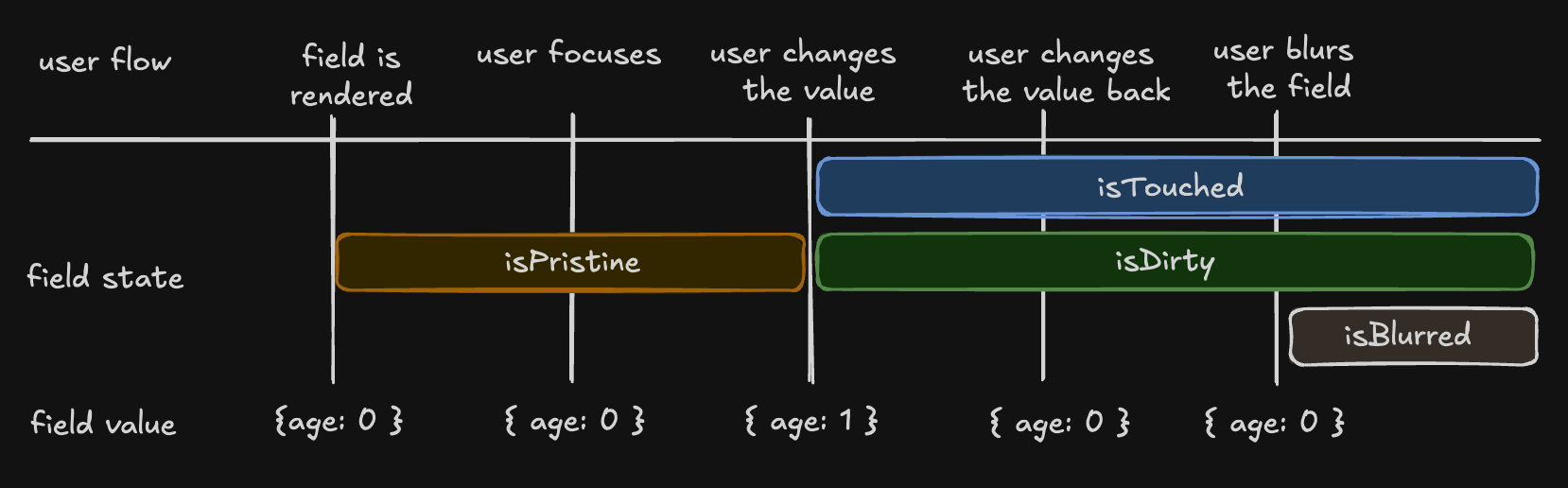
99
100## Understanding 'isDirty' in Different Libraries
101
102Non-Persistent `dirty` state
103
104**Libraries**: React Hook Form (RHF), Formik, Final Form.
105**Behavior**: A field is 'dirty' if its value differs from the default. Reverting to the default value makes it 'clean' again.
106
107Persistent `dirty` state
108
109**Libraries**: Angular Form, Vue FormKit.
110**Behavior**: A field remains 'dirty' once changed, even if reverted to the default value.
111
112We have chosen the persistent 'dirty' state model. To also support a non-persistent 'dirty' state, we introduce an additional flag:
113
114_"isDefaultValue"_, whether the field's current value is the default value
115
117const { isDefaultValue, isTouched } = field().state.meta
118
119// The following line will re-create the non-Persistent `dirty` functionality.
120const nonPersistentIsDirty = !isDefaultValue
122
123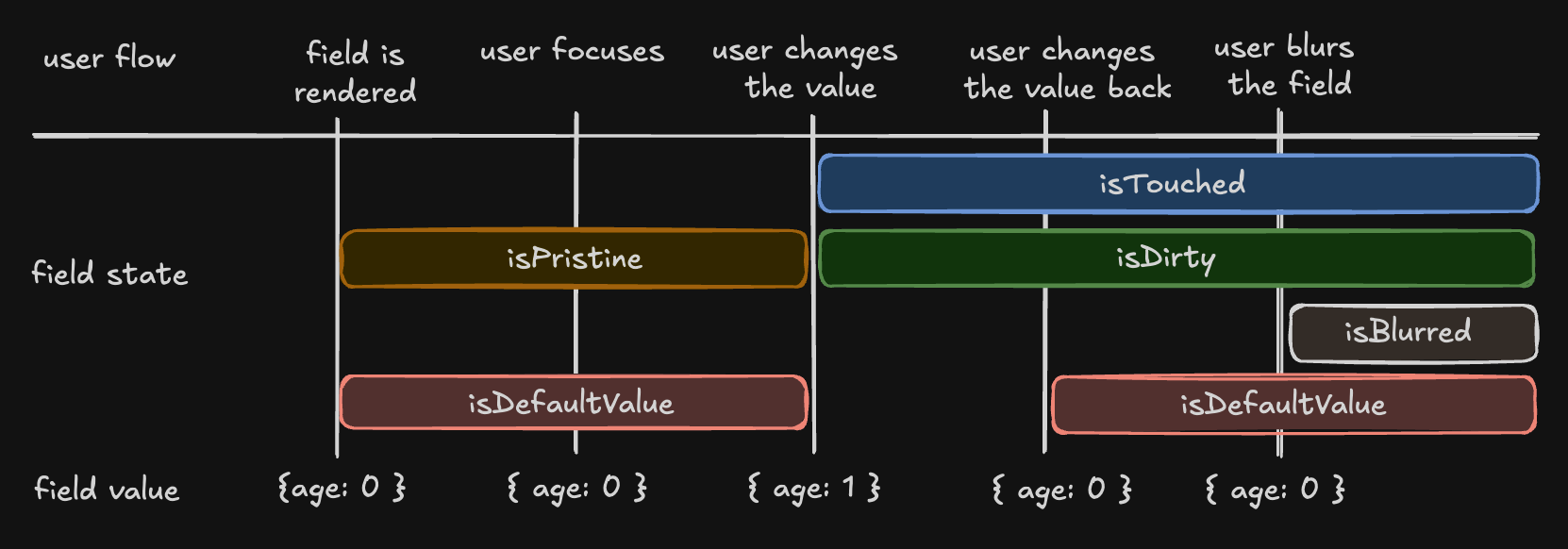
124
125## Field API
126
127The Field API is an object passed to the render prop function when creating a field. It provides methods for working with the field's state.
128
129Example:
130
132<input
133 name={field().name}
134 value={field().state.value}
135 onBlur={field().handleBlur}
136 onInput={(e) => field().handleChange(e.target.value)}
137/>
139
140## Validation
141
142`@tanstack/solid-form` provides both synchronous and asynchronous validation out of the box. Validation functions can be passed to the `form.Field` component using the `validators` prop.
143
144Example:
145
147<form.Field
148 name="firstName"
149 validators={{
150 onChange: ({ value }) =>
151 !value
152 ? 'A first name is required'
153 : value.length < 3
154 ? 'First name must be at least 3 characters'
155 : undefined,
156 onChangeAsync: async ({ value }) => {
157 await new Promise((resolve) => setTimeout(resolve, 1000))
158 return value.includes('error') && 'No "error" allowed in first name'
159 },
160 }}
161 children={(field) => (
162 <>
163 <input
164 name={field().name}
165 value={field().state.value}
166 onBlur={field().handleBlur}
167 onInput={(e) => field().handleChange(e.target.value)}
168 />
169 <p>{field().state.meta.errors[0]}</p>
170 </>
171 )}
172/>
174
175## Validation with Standard Schema Libraries
176
177In addition to hand-rolled validation options, we also support the [Standard Schema](https://github.com/standard-schema/standard-schema) specification.
178
179You can define a schema using any of the libraries implementing the specification and pass it to a form or field validator.
180
181Supported libraries include:
182
183[Zod](https://zod.dev/) (v3.24.0 or higher)
184[Valibot](https://valibot.dev/) (v1.0.0 or higher)
185[ArkType](https://arktype.io/) (v2.1.20 or higher)
186[Yup](https://github.com/jquense/yup) (v1.7.0 or higher)
187
189import { z } from 'zod'
190
191// ...
192;<form.Field
193 name="firstName"
194 validators={{
195 onChange: z.string().min(3, 'First name must be at least 3 characters'),
196 onChangeAsyncDebounceMs: 500,
197 onChangeAsync: z.string().refine(
198 async (value) => {
199 await new Promise((resolve) => setTimeout(resolve, 1000))
200 return !value.includes('error')
201 },
202 {
203 message: 'No "error" allowed in first name',
204 },
205 ),
206 }}
207 children={(field) => (
208 <>
209 <input
210 name={field().name}
211 value={field().state.value}
212 onBlur={field().handleBlur}
213 onInput={(e) => field().handleChange(e.target.value)}
214 />
215 <p>{field().state.meta.errors[0]}</p>
216 </>
217 )}
218/>
220
221## Reactivity
222
223`@tanstack/solid-form` offers various ways to subscribe to form and field state changes, most notably the `form.useStore` hook and the `form.Subscribe` component. These methods allow you to optimize your form's rendering performance by only updating components when necessary.
224
225Example:
226
228const firstName = form.useStore((state) => state.values.firstName)
229//...
230<form.Subscribe
231 selector={(state) => ({
232 canSubmit: state.canSubmit,
233 isSubmitting: state.isSubmitting,
234 })}
235 children={(state) => (
236 <button type="submit" disabled={!state().canSubmit}>
237 {state().isSubmitting ? '...' : 'Submit'}
238 </button>
239 )}
240/>
242
243## Array Fields
244
245Array fields allow you to manage a list of values within a form, such as a list of hobbies. You can create an array field using the `form.Field` component with the `mode="array"` prop.
246
247When working with array fields, you can use the fields `pushValue`, `removeValue`, `swapValues` and `moveValue` methods to add, remove, swap, and move a value from one index to another within the array, respectively. Additional helper methods such as `insertValue`, `replaceValue`, and `clearValues` are also available for inserting, replacing, and clearing array values.
248
249Example:
250
252<form.Field
253 name="hobbies"
254 mode="array"
255 children={(hobbiesField) => (
256 <div>
257 Hobbies
258 <div>
259 <Show
260 when={hobbiesField().state.value.length > 0}
261 fallback={'No hobbies found.'}
262 >
263 <Index each={hobbiesField().state.value}>
264 {(_, i) => (
265 <div>
266 <form.Field
267 name={`hobbies[${i}].name`}
268 children={(field) => (
269 <div>
270 <label for={field().name}>Name:</label>
271 <input
272 id={field().name}
273 name={field().name}
274 value={field().state.value}
275 onBlur={field().handleBlur}
276 onInput={(e) => field().handleChange(e.target.value)}
277 />
278 <button
279 type="button"
280 onClick={() => hobbiesField().removeValue(i)}
281 >
282 X
283 </button>
284 </div>
285 )}
286 />
287 <form.Field
288 name={`hobbies[${i}].description`}
289 children={(field) => {
290 return (
291 <div>
292 <label for={field().name}>Description:</label>
293 <input
294 id={field().name}
295 name={field().name}
296 value={field().state.value}
297 onBlur={field().handleBlur}
298 onInput={(e) => field().handleChange(e.target.value)}
299 />
300 </div>
301 )
302 }}
303 />
304 </div>
305 )}
306 </Index>
307 </Show>
308 </div>
309 <button
310 type="button"
311 onClick={() =>
312 hobbiesField().pushValue({
313 name: '',
314 description: '',
315 yearsOfExperience: 0,
316 })
317 }
318 >
319 Add hobby
320 </button>
321 </div>
322 )}
323/>
325
326These are the basic concepts and terminology used in the `@tanstack/solid-form` library. Understanding these concepts will help you work more effectively with the library and create complex forms with ease.