
Open History to see the last commit

1---
2id: fetching-external-api
3title: Calling an external API using TanStack Start
4---
5
6This guide demonstrates how to integrate external API calls into your TanStack Start application using route loaders. We will use TMDB API to fetch popular movies using TanStack Start and understand how to fetch data in a TanStack Start app.
7
8The complete code for this tutorial is available on [GitHub](https://github.com/shrutikapoor08/tanstack-start-movies).
9
10## What You'll Learn
11
12Setting up external API integration with TanStack Start
13Implementing route loaders for server-side data fetching
14Building responsive UI components with fetched data
15Handling loading states and error management
16
17## Prerequisites
18
19Basic knowledge of React and TypeScript
20Node.js (v18+) and `pnpm` installed on your machine
21A TMDB API key (free at [themoviedb.org](https://www.themoviedb.org))
22
23## Nice to know
24
25[TanStack Router](/router/latest/docs/framework/react/routing/routing-concepts)
26
27## Setting up a TanStack Start Project
28
29First, let's create a new TanStack Start project:
30
32pnpx create-start-app movie-discovery
33cd movie-discovery
35
36When this script runs, it will ask you a few setup questions. You can either pick choices that work for you or just press enter to accept the defaults.
37
38Optionally, you can pass in a `--add-on` flag to get options such as Shadcn, Clerk, Convex, TanStack Query, etc.
39
40Once setup is complete, install dependencies and start the development server:
41
43pnpm i
44pnpm dev
46
47## Understanding the Project Structure
48
49At this point, the project structure should look like this:
50
52/movie-discovery
53├── src/
54│ ├── routes/
55│ │ ├── __root.tsx # Root layout
56│ │ ├── index.tsx # Home page
57│ │ └── fetch-movies.tsx # Movie fetching route
58│ ├── types/
59│ │ └── movie.ts # Movie type definitions
60│ ├── router.tsx # Router configuration
61│ ├── routeTree.gen.ts # Generated route tree
62│ └── styles.css # Global styles
63├── public/ # Static assets
64├── vite.config.ts # TanStack Start configuration
65├── package.json # Project dependencies
66└── tsconfig.json # TypeScript configuration
67
69
70Once your project is set up, you can access your app at localhost:3000. You should see the default TanStack Start welcome page.
71
72## Step 1: Setup a .env file with TMDB_AUTH_TOKEN
73
74To fetch movies from the TMDB API, you need an authentication token. You can get this for free at themoviedb.org.
75
76First, let's set up environment variables for our API key. Create a `.env` file in your project root:
77
79touch .env
80
82
83Add your TMDB API token to this file:
84
86TMDB_AUTH_TOKEN=your_bearer_token_here
88
89_Important_: Make sure to add `.env` to your `.gitignore` file to keep your API keys secure.
90
91## Step 2: Defining Data Types
92
93Let's create TypeScript interfaces for our movie data. Create a new file at `src/types/movie.ts`:
94
96// src/types/movie.ts
97export interface Movie {
98 id: number
99 title: string
100 overview: string
101 poster_path: string | null
102 backdrop_path: string | null
103 release_date: string
104 vote_average: number
105 popularity: number
106}
107
108export interface TMDBResponse {
109 page: number
110 results: Movie[]
111 total_pages: number
112 total_results: number
113}
115
116## Step 3: Creating the Route with API Fetch Function
117
118Now let's create our route that fetches data from the TMDB API. Create a new file at `src/routes/fetch-movies.tsx`:
119
121// src/routes/fetch-movies.tsx
122import { createFileRoute } from '@tanstack/react-router'
123import type { Movie, TMDBResponse } from '../types/movie'
124
125const API_URL =
126 'https://api.themoviedb.org/3/discover/movie?include_adult=false&include_video=false&language=en-US&page=1&sort_by=popularity.desc'
127
128async function fetchPopularMovies(): Promise<TMDBResponse> {
129 const token = process.env.TMDB_AUTH_TOKEN
130 if (!token) {
131 throw new Error('Missing TMDB_AUTH_TOKEN environment variable')
132 }
133
134 const response = await fetch(API_URL, {
135 headers: {
136 accept: 'application/json',
137 Authorization: `Bearer ${token}`,
138 },
139 })
140
141 if (!response.ok) {
142 throw new Error(`Failed to fetch movies: ${response.statusText}`)
143 }
144
145 const data = (await response.json()) as TMDBResponse
146 return data
147}
148
149export const Route = createFileRoute('/fetch-movies')({
150 component: MoviesPage,
151 loader: async (): Promise<{ movies: Movie[]; error: string | null }> => {
152 try {
153 const moviesData = await fetchPopularMovies()
154 return { movies: moviesData.results, error: null }
155 } catch (error) {
156 console.error('Error fetching movies:', error)
157 return { movies: [], error: 'Failed to load movies' }
158 }
159 },
160})
162
163## Step 4: Building the Movie Components
164
165Now let's create the components that will display our movie data. Add these components to the same `fetch-movies.tsx` file:
166
168// MovieCard component
169const MovieCard = ({ movie }: { movie: Movie }) => {
170 return (
171 <div
172 className="bg-white/10 border border-white/20 rounded-lg overflow-hidden backdrop-blur-sm shadow-md hover:shadow-xl transition-all duration-300 hover:scale-105"
173 aria-label={`Movie: ${movie.title}`}
174 role="group"
175 >
176 {movie.poster_path && (
177 <img
178 src={`https://image.tmdb.org/t/p/w500${movie.poster_path}`}
179 alt={movie.title}
180 className="w-full h-64 object-cover"
181 />
182 )}
183 <div className="p-4">
184 <MovieDetails movie={movie} />
185 </div>
186 </div>
187 )
188}
189
190// MovieDetails component
191const MovieDetails = ({ movie }: { movie: Movie }) => {
192 return (
193 <>
194 <h3 className="text-lg font-semibold mb-2 line-clamp-2">{movie.title}</h3>
195 <p className="text-sm text-gray-300 mb-3 line-clamp-3 h-10">
196 {movie.overview}
197 </p>
198 <div className="flex justify-between items-center text-xs text-gray-400">
199 <span>{movie.release_date}</span>
200 <span className="flex items-center">
201 ⭐️ {movie.vote_average.toFixed(1)}
202 </span>
203 </div>
204 </>
205 )
206}
208
209## Step 5: Creating the MoviesPage Component
210
211Finally, let's create the main component that consumes the loader data:
212
214// MoviesPage component
215const MoviesPage = () => {
216 const { movies, error } = Route.useLoaderData()<{
217 movies: Movie[]
218 error: string | null
219 }>()
220
221 return (
222 <div
223 className="flex items-center justify-center min-h-screen p-4 text-white"
224 style={{
225 backgroundColor: '#000',
226 backgroundImage:
227 'radial-gradient(ellipse 60% 60% at 0% 100%, #444 0%, #222 60%, #000 100%)',
228 }}
229 role="main"
230 aria-label="Popular Movies Section"
231 >
232 <div className="w-full max-w-6xl p-8 rounded-xl backdrop-blur-md bg-black/50 shadow-xl border-8 border-black/10">
233 <h1 className="text-3xl mb-6 font-bold text-center">Popular Movies</h1>
234
235 {error && (
236 <div
237 className="text-red-400 text-center mb-4 p-4 bg-red-900/20 rounded-lg"
238 role="alert"
239 >
240 {error}
241 </div>
242 )}
243
244 {movies.length > 0 ? (
245 <div
246 className="grid grid-cols-1 md:grid-cols-2 lg:grid-cols-3 xl:grid-cols-4 gap-6"
247 aria-label="Movie List"
248 >
249 {movies.slice(0, 12).map((movie) => (
250 <MovieCard key={movie.id} movie={movie} />
251 ))}
252 </div>
253 ) : (
254 !error && (
255 <div className="text-center text-gray-400" role="status">
256 Loading movies...
257 </div>
258 )
259 )}
260 </div>
261 </div>
262 )
263}
265
266### Understanding How It All Works Together
267
269sequenceDiagram
270 autonumber
271 actor U as User
272 participant R as Router (TanStack Start)
273 participant L as Route Loader (/fetch-movies)
274 participant A as External API (TMDB)
275 participant V as MoviesPage (UI)
276
277 U->>R: Navigate to /fetch-movies
278 R->>L: Invoke loader (server-side)
279 L->>A: GET /movie/popular\nAuthorization: Bearer <TOKEN>
280 A-->>L: JSON TMDBResponse
281 alt response.ok
282 L-->>R: { movies, error: null }
283 R->>V: Render SSR with movies
284 V-->>U: HTML with movie grid
285 else non-ok / error
286 L-->>R: { movies: [], error: "Failed to load movies" }
287 R->>V: Render SSR with error alert
288 V-->>U: HTML with error state
289 end
290
291 note over L,V: Loader validates response.ok,\nreturns data or error for initial render
293
294Let's break down how the different parts of our application work together:
295
296Route loader: When a user visits `/fetch-movies`, the loader function runs on the server
297API call: The loader calls `fetchPopularMovies()` which makes an HTTP request to TMDB
298Server-Side rendering: The data is fetched on the server reducing the load on the client side
299Component rendering: The `MoviesPage` component receives the data via `Route.useLoaderData()`
300Rendering UI: The movie cards are rendered with the fetched data
301
302## Step 6: Testing Your Application
303
304Now you can test your application by visiting [http://localhost:3000/fetch-movies](http://localhost:3000/fetch-movies). If everything is set up correctly, you should see a grid of popular movies with their posters, titles, and ratings. Your app should look like this:
305
306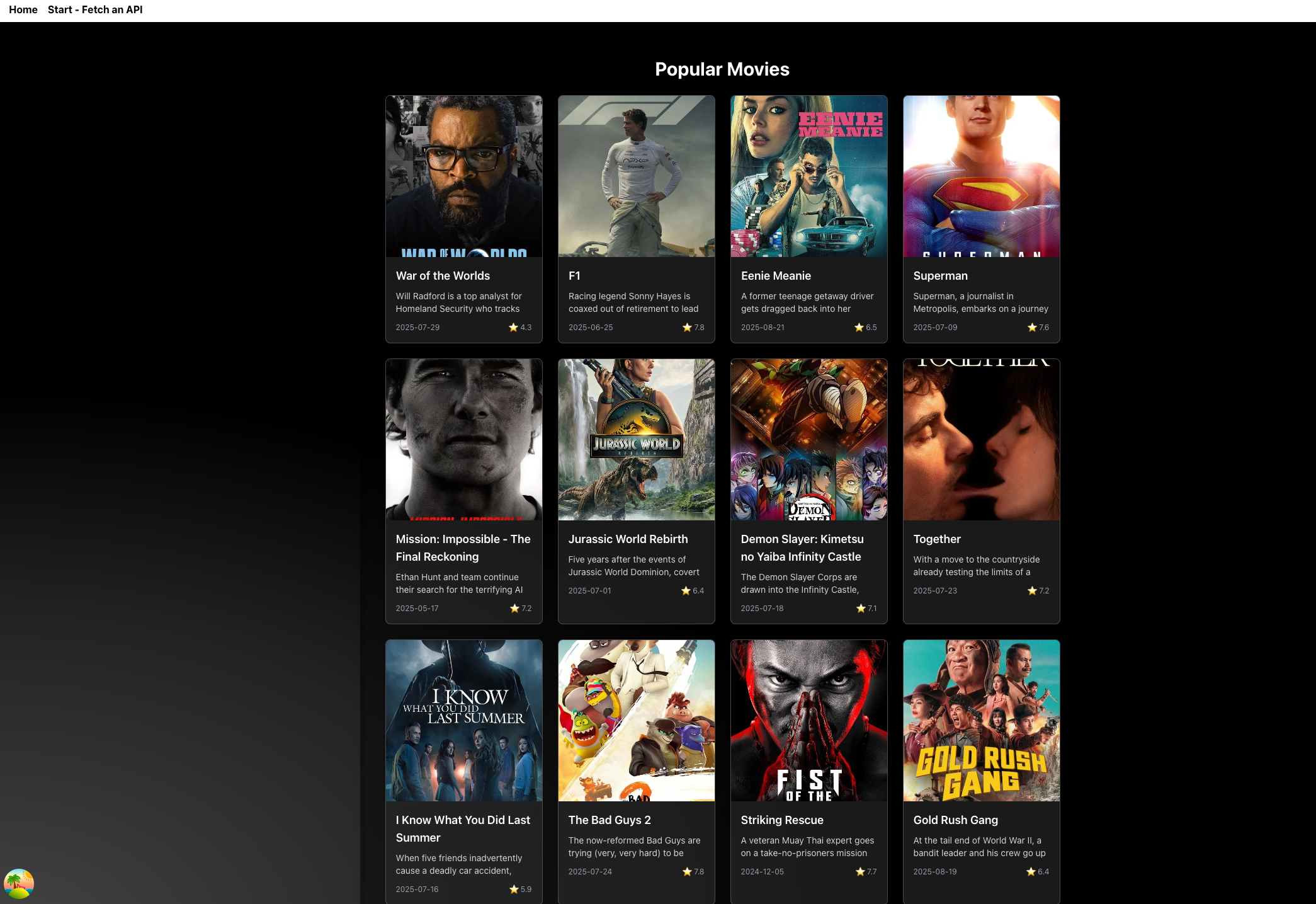
307
308## Conclusion
309
310You've successfully built a movie discovery app that integrates with an external API using TanStack Start. This tutorial demonstrated how to use route loaders for server-side data fetching and building UI components with external data.
311
312While fetching data at build time in TanStack Start is perfect for static content like blog posts or product pages, it's not ideal for interactive apps. If you need features like real-time updates, caching, or infinite scrolling, you'll want to use [TanStack Query](query/latest) on the client side instead. TanStack Query makes it easy to handle dynamic data with built-in caching, background updates, and smooth user interactions. By using TanStack Start for static content and TanStack Query for interactive features, you get fast loading pages plus all the modern functionality users expect.