
Open History to see the last commit

1---
2id: reading-and-writing-file
3title: Building a Full Stack DevJokes App with TanStack Start
4---
5
6This tutorial will guide you through building a complete full-stack application using TanStack Start. You'll create a DevJokes app where users can view and add developer-themed jokes, demonstrating key concepts of TanStack Start including server functions, file-based data storage, and React components.
7
8Here's a demo of the app in action:
9
10<iframe width="560" height="315" src="https://www.youtube.com/embed/zd0rtKbtlgU?si=7W1Peoo0W0WvZmAd" title="YouTube video player" frameborder="0" allow="accelerometer; autoplay; clipboard-write; encrypted-media; gyroscope; picture-in-picture; web-share" referrerpolicy="strict-origin-when-cross-origin" allowfullscreen></iframe>
11
12The complete code for this tutorial is available on [GitHub](https://github.com/shrutikapoor08/devjokes).
13
14## What You'll Learn
15
16Setting up a TanStack Start project
17Implementing server functions
18Reading and writing data to files
19Building a complete UI with React components
20Using TanStack Router for data fetching and navigation
21
22## Prerequisites
23
24Basic knowledge of React and TypeScript.
25Node.js and `pnpm` installed on your machine
26
27## Nice to know
28
29[Server Side Rendering (SSR)](/router/latest/docs/framework/react/guide/ssr)
30[TanStack Router concepts](/router/latest/docs/framework/react/routing/routing-concepts)
31[React Query concepts](/query/latest/docs/framework/react/overview)
32
33## Setting up a TanStack Start Project
34
35First, let's create a new TanStack Start project:
36
38pnpx @tanstack/cli@latest create devjokes
39cd devjokes
41
42When this script runs, it will ask you a few setup questions. You can either pick choices that work for you or just press enter to accept the defaults.
43
44Optionally, you can pass in a `--add-on` flag to get options such as Shadcn, Clerk, Convex, TanStack Query, etc.
45
46Once setup is complete, install dependencies and start the development server:
47
49pnpm i
50pnpm dev
52
53For this project, we'll need the `uuid` package:
54
56# Install uuid for generating unique IDs
57pnpm add uuid
59
60## Understanding the project structure
61
62At this point, the project structure should look like this -
63
66├── src/
67│ ├── routes/
68│ │ ├── demo/ # Demo routes
69│ │ ├── __root.tsx # Root layout
70│ │ └── index.tsx # Home page
71│ ├── components/ # React components
72│ ├── data/ # Data files
73│ ├── router.tsx # Router configuration
74│ ├── routeTree.gen.ts # Generated route tree
75│ └── styles.css # Global styles
76├── public/ # Static assets
77├── vite.config.ts or rsbuild.config.ts # TanStack Start configuration
78├── package.json # Project dependencies
79└── tsconfig.json # TypeScript configuration
81
82This structure might seem overwhelming at first, but here are the key files you need to focus on:
83
84`src/router.tsx` - Sets up routing for your application
85`src/routes/__root.tsx` - The root layout component where you can add global styles and components
86`src/routes/index.tsx` - Your home page
87
88Once your project is set up, you can access your app at `localhost:3000`. You should see the default TanStack Start welcome page.
89
90At this point, your app will look like this:
91
92
93
94## Step 1: Reading Data From a File
95
96Let's start by creating a file-based storage system for our jokes.
97
98### Step 1.1: Create a JSON File with Jokes
99
100Let's set up a list of jokes that we can use to render on the page. Create a `jokes.json` file within `src/data`:
101
103touch src/data/jokes.json
105
106Now, let's add some sample jokes to this file:
107
109[
110 {
111 "id": "1",
112 "question": "Why don't keyboards sleep?",
113 "answer": "Because they have two shifts"
114 },
115 {
116 "id": "2",
117 "question": "Are you a RESTful API?",
118 "answer": "Because you GET my attention, PUT some love, POST the cutest smile, and DELETE my bad day"
119 },
120 {
121 "id": "3",
122 "question": "I used to know a joke about Java",
123 "answer": "But I ran out of memory."
124 },
125 {
126 "id": "4",
127 "question": "Why do Front-End Developers eat lunch alone?",
128 "answer": "Because, they don't know how to join tables."
129 },
130 {
131 "id": "5",
132 "question": "I am declaring a war.",
133 "answer": "var war;"
134 }
135]
137
138### Step 1.2: Create Types for Our Data
139
140Let's create a file to define our data types. Create a new file at `src/types/index.ts`:
141
143// src/types/index.ts
144export interface Joke {
145 id: string
146 question: string
147 answer: string
148}
149
150export type JokesData = Joke[]
152
153### Step 1.3: Create Server Functions to Read the File
154
155Let's create a new file `src/serverActions/jokesActions.ts` to create a server function to perform a read-write operation. We will be creating a server function using [`createServerFn`](https://tanstack.com/start/latest/docs/framework/react/guide/server-functions).
156
158// src/serverActions/jokesActions.ts
159import { createServerFn } from '@tanstack/react-start'
160import * as fs from 'node:fs'
161import type { JokesData } from '../types'
162
163const JOKES_FILE = 'src/data/jokes.json'
164
165export const getJokes = createServerFn({ method: 'GET' }).handler(async () => {
166 const jokes = await fs.promises.readFile(JOKES_FILE, 'utf-8')
167 return JSON.parse(jokes) as JokesData
168})
170
171In this code, we are using `createServerFn` to create a server function that reads the jokes from the JSON file. The `handler` function is where we are using the `fs` module to read the file.
172
173### Step 1.4: Consume Server Function on the Client Side
174
175Now to consume this server function, we can simply call it in our code using TanStack Router which already comes with TanStack Start!
176
177Now let's create a new component `JokesList` to render the jokes on the page with a little Tailwind styling sprinkle.
178
180// src/components/JokesList.tsx
181import { Joke } from '../types'
182
183interface JokesListProps {
184 jokes: Joke[]
185}
186
187export function JokesList({ jokes }: JokesListProps) {
188 if (!jokes || jokes.length === 0) {
189 return <p className="text-gray-500 italic">No jokes found. Add some!</p>
190 }
191
192 return (
193 <div className="space-y-4">
194 <h2 className="text-xl font-semibold">Jokes Collection</h2>
195 {jokes.map((joke) => (
196 <div
197 key={joke.id}
198 className="bg-white p-4 rounded-lg shadow-md border border-gray-200"
199 >
200 <p className="font-bold text-lg mb-2">{joke.question}</p>
201 <p className="text-gray-700">{joke.answer}</p>
202 </div>
203 ))}
204 </div>
205 )
206}
208
209Now let's call our server function inside `index.tsx` using TanStack Router which already comes with TanStack Start!
210
212// src/routes/index.tsx
213import { createFileRoute } from '@tanstack/react-router'
214import { getJokes } from './serverActions/jokesActions'
215import { JokesList } from './JokesList'
216
217export const Route = createFileRoute('/')({
218 loader: async () => {
219 // Load jokes data when the route is accessed
220 return getJokes()
221 },
222 component: App,
223})
224
225const App = () => {
226 const jokes = Route.useLoaderData() || []
227
228 return (
229 <div className="max-w-2xl mx-auto py-12 px-4 space-y-6">
230 <h1 className="text-4xl font-bold text-center mb-10">DevJokes</h1>
231 <JokesList jokes={jokes} />
232 </div>
233 )
234}
236
237When the page loads, `jokes` will have data from the `jokes.json` file already!
238
239With a little Tailwind styling, the app should look like this:
240
241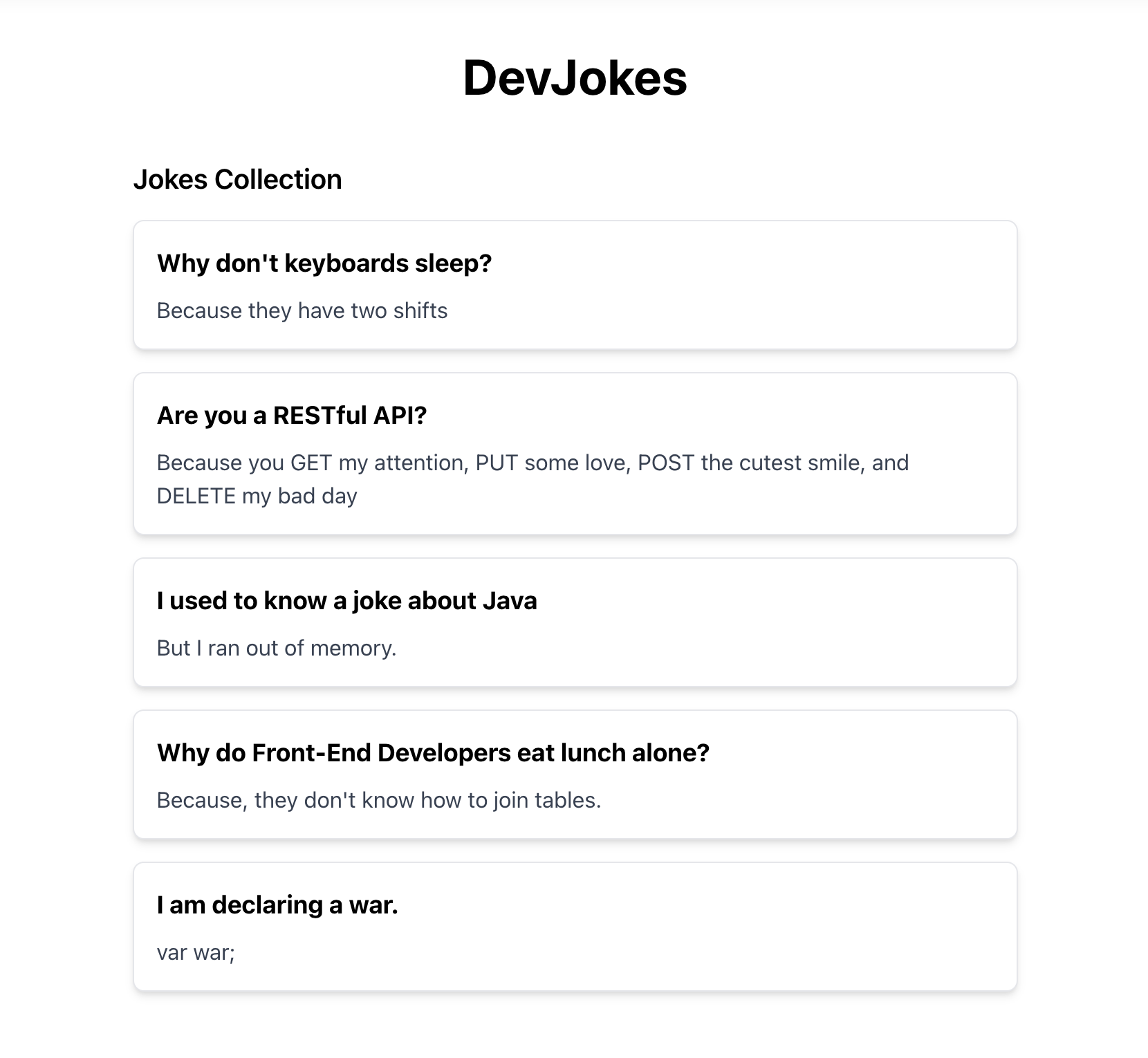
242
243## Step 2: Writing Data to a File
244
245So far, we have been able to read from the file successfully! We can use the same approach to write to the `jokes.json` file using `createServerFunction`.
246
247### Step 2.1: Create Server Function to Write to the File
248
249It's time to modify the `jokes.json` file so that we can add new jokes to it. Let's create another server function but this time with a `POST` method to write to the same file.
250
252// src/serverActions/jokesActions.ts
253import { createServerFn } from '@tanstack/react-start'
254import * as fs from 'node:fs'
255import { v4 as uuidv4 } from 'uuid' // Add this import
256import type { Joke, JokesData } from '../types'
257
258const JOKES_FILE = 'src/data/jokes.json'
259
260export const getJokes = createServerFn({ method: 'GET' }).handler(async () => {
261 const jokes = await fs.promises.readFile(JOKES_FILE, 'utf-8')
262 return JSON.parse(jokes) as JokesData
263})
264
265// Add this new server function
266export const addJoke = createServerFn({ method: 'POST' })
267 .validator((data: { question: string; answer: string }) => {
268 // Validate input data
269 if (!data.question || !data.question.trim()) {
270 throw new Error('Joke question is required')
271 }
272 if (!data.answer || !data.answer.trim()) {
273 throw new Error('Joke answer is required')
274 }
275 return data
276 })
277 .handler(async ({ data }) => {
278 try {
279 // Read the existing jokes from the file
280 const jokesData = await getJokes()
281
282 // Create a new joke with a unique ID
283 const newJoke: Joke = {
284 id: uuidv4(),
285 question: data.question,
286 answer: data.answer,
287 }
288
289 // Add the new joke to the list
290 const updatedJokes = [...jokesData, newJoke]
291
292 // Write the updated jokes back to the file
293 await fs.promises.writeFile(
294 JOKES_FILE,
295 JSON.stringify(updatedJokes, null, 2),
296 'utf-8',
297 )
298
299 return newJoke
300 } catch (error) {
301 console.error('Failed to add joke:', error)
302 throw new Error('Failed to add joke')
303 }
304 })
306
307In this code:
308
309We are using `createServerFn` to create server functions that run on the server but can be called from the client. This server function is used to write data to the file.
310We are going to first use `validator` to validate the input data. This is a good practice to ensure that the data we are receiving is in the correct format.
311We are going to perform the actual write operation in the `handler` function.
312`getJokes` reads the jokes from our JSON file.
313`addJoke` validates the input data and adds a new joke to our file.
314We're using `uuidv4()` to generate unique IDs for our jokes.
315
316### Step 2.2: Adding a Form to Add Jokes to our JSON File
317
318Now, let's modify our home page to display jokes and provide a form to add new ones. Let's create a new component called `JokeForm.jsx` and add the following form to it:
319
321// src/components/JokeForm.tsx
322import { useState } from 'react'
323import { useRouter } from '@tanstack/react-router'
324import { addJoke } from '../serverActions/jokesActions'
325
326export function JokeForm() {
327 const router = useRouter()
328 const [question, setQuestion] = useState('')
329 const [answer, setAnswer] = useState('')
330 const [isSubmitting, setIsSubmitting] = useState(false)
331 const [error, setError] = useState<string | null>(null)
332
333 return (
334 <form onSubmit={handleSubmit} className="mb-8">
335 {error && (
336 <div className="bg-red-100 text-red-700 p-2 rounded mb-4">{error}</div>
337 )}
338
339 <div className="flex flex-col sm:flex-row gap-4 mb-8">
340 <input
341 id="question"
342 type="text"
343 placeholder="Enter joke question"
344 className="w-full p-2 border rounded focus:ring focus:ring-blue-300 flex-1"
345 value={question}
346 onChange={(e) => setQuestion(e.target.value)}
347 required
348 />
349
350 <input
351 id="answer"
352 type="text"
353 placeholder="Enter joke answer"
354 className="w-full p-2 border rounded focus:ring focus:ring-blue-300 flex-1 py-4"
355 value={answer}
356 onChange={(e) => setAnswer(e.target.value)}
357 required
358 />
359
360 <button
361 type="submit"
362 disabled={isSubmitting}
363 className="bg-blue-500 hover:bg-blue-600 text-white font-medium rounded disabled:opacity-50 px-4"
364 >
365 {isSubmitting ? 'Adding...' : 'Add Joke'}
366 </button>
367 </div>
368 </form>
369 )
370}
372
373### Step 2.3: Wire Up the Form to the Server Function
374
375Now, let's wire the form up to our `addJoke` server function in the `handleSubmit` function. Calling a server action is simple! It's just a function call.
376
378//JokeForm.tsx
379import { useState } from 'react'
380import { useRouter } from '@tanstack/react-router'
381import { addJoke } from '../serverActions/jokesActions'
382
383export function JokeForm() {
384 const router = useRouter()
385 const [question, setQuestion] = useState('')
386 const [answer, setAnswer] = useState('')
387 const [isSubmitting, setIsSubmitting] = useState(false)
388 const [error, setError] = useState<string | null>(null)
389
390 const handleSubmit = async () => {
391 if (!question || !answer || isSubmitting) return
392 try {
393 setIsSubmitting(true)
394 await addJoke({
395 data: { question, answer },
396 })
397
398 // Clear form
399 setQuestion('')
400 setAnswer('')
401
402 // Refresh data
403 router.invalidate()
404 } catch (error) {
405 console.error('Failed to add joke:', error)
406 setError('Failed to add joke')
407 } finally {
408 setIsSubmitting(false)
409 }
410 }
411
412 return (
413 <form onSubmit={handleSubmit} className="mb-8">
414 {error && (
415 <div className="bg-red-100 text-red-700 p-2 rounded mb-4">{error}</div>
416 )}
417 <div className="flex flex-col sm:flex-row gap-4 mb-8">
418 <input
419 id="question"
420 type="text"
421 placeholder="Enter joke question"
422 className="w-full p-2 border rounded focus:ring focus:ring-blue-300 flex-1"
423 value={question}
424 onChange={(e) => setQuestion(e.target.value)}
425 required
426 />
427 <input
428 id="answer"
429 type="text"
430 placeholder="Enter joke answer"
431 className="w-full p-2 border rounded focus:ring focus:ring-blue-300 flex-1 py-4"
432 value={answer}
433 onChange={(e) => setAnswer(e.target.value)}
434 required
435 />
436 <button
437 type="submit"
438 disabled={isSubmitting}
439 className="bg-blue-500 hover:bg-blue-600 text-white font-medium rounded disabled:opacity-50 px-4"
440 >
441 {isSubmitting ? 'Adding...' : 'Add Joke'}
442 </button>
443 </div>
444 </form>
445 )
446}
448
449With this, our UI should look like this:
450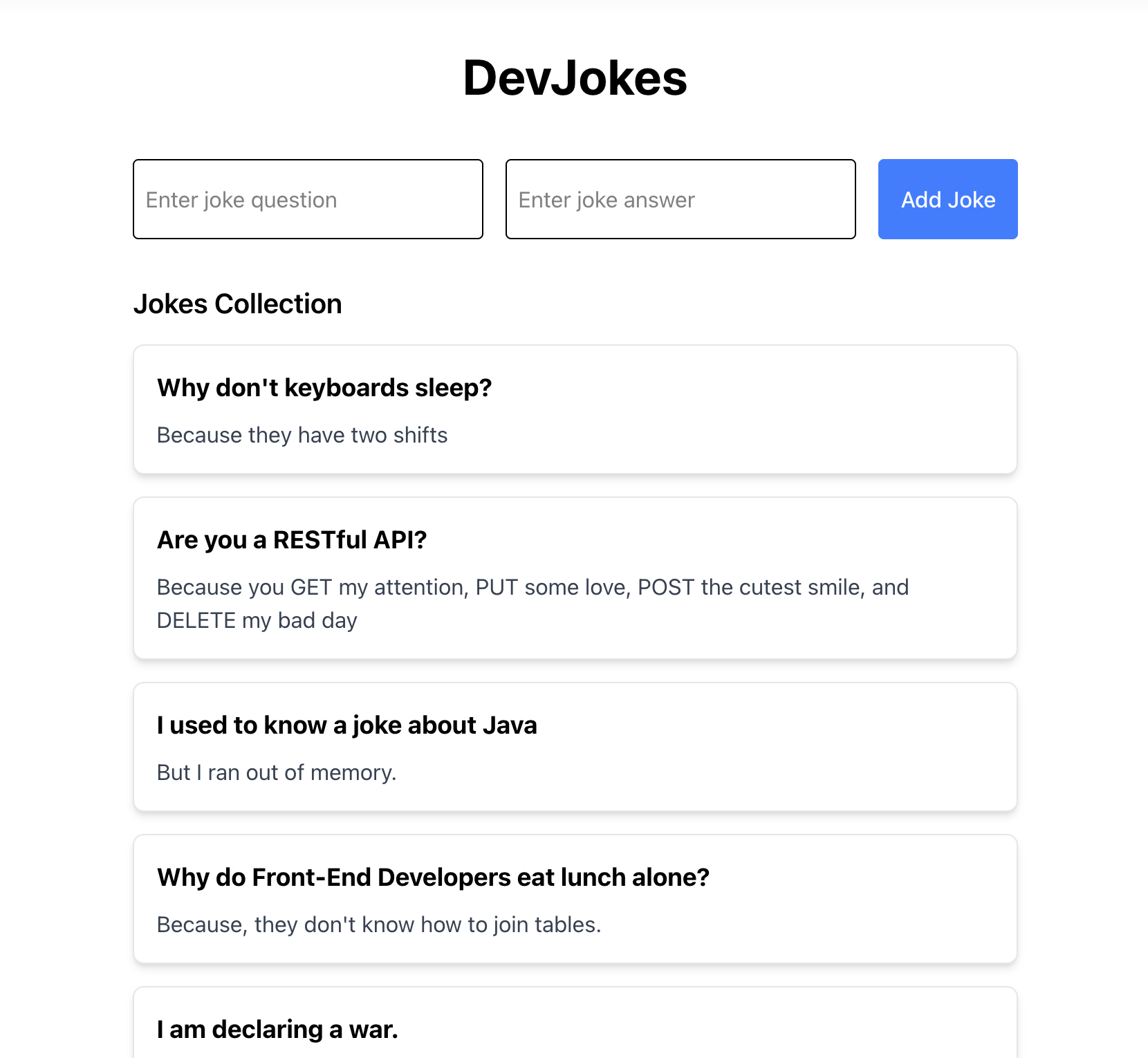
451
452## Understanding How It All Works Together
453
454Let's break down how the different parts of our application work together:
455
456**Server Functions**: These run on the server and handle data operations
457`getJokes`: Reads the jokes from our JSON file
458`addJoke`: Adds a new joke to our JSON file
459
460**TanStack Router**: Handles routing and data loading
461The loader function fetches jokes data when the route is accessed
462`useLoaderData` makes this data available in our component
463`router.invalidate()` refreshes the data when we add a new joke
464
465**React Components**: Build the UI of our application
466`JokesList`: Displays the list of jokes
467`JokeForm`: Provides a form for adding new jokes
468
469**File-Based Storage**: Stores our jokes in a JSON file
470Reading and writing are handled by Node.js `fs` module
471Data is persisted between server restarts
472
473## How Data Flows Through the Application
474
475### Data Flow
476
478sequenceDiagram
479autonumber
480actor User
481participant UI as Browser (HomePage + Form)
482participant Loader as Route Loader (loader)
483participant Server
484participant Store as jokes.json
485
486%% Visiting the Home Page
487User ->> UI: Visit /
488UI ->> Loader: loader() calls getJokes()
489Loader ->> Server: getJokes()
490Server ->> Store: Read jokes.json
491Store -->> Server: jokes data
492Server -->> Loader: jokes[]
493Loader -->> UI: useLoaderData() → jokes[]
494
495%% Adding a New Joke
496User ->> UI: Fill form and submit
497UI ->> Server: handleSubmit → addJoke(newJoke)
498Server ->> Store: Read jokes.json
499Server ->> Store: Write updated jokes.json
500Server -->> UI: addJoke() resolved
501UI ->> Loader: router.invalidate() (re-run loader)
502Loader ->> Server: getJokes()
503Server ->> Store: Read jokes.json
504Store -->> Server: updated jokes[]
505Server -->> Loader: updated jokes[]
506Loader -->> UI: useLoaderData() → updated jokes[]
508
509When a user visits the home page:
510
511The `loader` function in the route calls `getJokes()` server function
512The server reads `jokes.json` and returns the jokes data
513This data is passed to the `HomePage` component through `useLoaderData()`
514The `HomePage` component passes the data to the `JokesList` component
515
516When a user adds a new joke:
517
518They fill out the form and submit it
519The `handleSubmit` function calls the `addJoke()` server function
520The server reads the current jokes, adds the new joke, and writes the updated data back to `jokes.json`
521After the operation completes, we call `router.invalidate()` to refresh the data
522This triggers the loader again, fetching the updated jokes
523The UI updates to show the new joke in the list
524
525Here's a demo of the app in action:
526
527<iframe width="560" height="315" src="https://www.youtube.com/embed/zd0rtKbtlgU?si=7W1Peoo0W0WvZmAd" title="YouTube video player" frameborder="0" allow="accelerometer; autoplay; clipboard-write; encrypted-media; gyroscope; picture-in-picture; web-share" referrerpolicy="strict-origin-when-cross-origin" allowfullscreen></iframe>
528
529## Common Issues and Debugging
530
531Here are some common issues you might encounter when building your TanStack Start application and how to resolve them:
532
533### Server Functions Not Working
534
535If your server functions aren't working as expected:
536
537Check that you're using the correct HTTP method (`GET`, `POST`, etc.)
538Ensure file paths are correct and accessible to the server
539Check the server console for error messages
540Make sure you're not using client-only APIs in server functions
541
542### Route Data Not Loading
543
544If route data isn't loading properly:
545
546Verify that your loader function is properly implemented
547Check that you're using `useLoaderData()` correctly
548Look for errors in the browser console
549Make sure your server function is working correctly
550
551### Form Submission Issues
552
553If form submissions aren't working:
554
555Check for validation errors in your server function
556Verify that form event prevention (`e.preventDefault()`) is working
557Make sure state updates are happening correctly
558Look for network errors in the browser's Developer Tools
559
560### File Reading/Writing Issues
561
562When working with file-based storage:
563
564Ensure file paths are correct
565Check file permissions
566Make sure you're handling async operations properly with `await`
567Add proper error handling for file operations
568
569## Conclusion
570
571Congratulations! You've built a full-stack DevJokes app using TanStack Start. In this tutorial, you've learned:
572
573How to set up a TanStack Start project
574How to implement server functions for data operations
575How to read and write data to files
576How to build React components for your UI
577How to use TanStack Router for routing and data fetching
578
579This simple application demonstrates the power of TanStack Start for building full-stack applications with a minimal amount of code. You can extend this app by adding features like:
580
581Joke categories
582Ability to edit and delete jokes
583User authentication
584Voting for favorite jokes
585
586The complete code for this tutorial is available on [GitHub](https://github.com/shrutikapoor08/devjokes).