
Open History to see the last commit

1import {Link} from '@tanstack/react-router'
2import {
3 GHLink,
4 HighLightComponent,
5} from '/src/components/tutorial'
6
7## How do collections work?
8
9By default, collections sync with your remote data source when first used in a live query and whenever mutations occur (updates, inserts, deletes, etc.).
10
11When you create a collection, you need to specify how it can sync itself with the server.
12For simple use cases, this can be accomplished through API calls (managed by <a target="_blank" href="https://tanstack.com/query/latest">TanStack Query</a>), but more advanced scenarios (e.g. two-way sync, multiple clients, etc.) might require sync engines like <a target="_blank" href="https://tanstack.com/db/latest/docs/collections/electric-collection">ElectricSQL</a>.
13
14Our todo app is very simple: there's only one user who can edit the projects, so we can use a good ol' REST API to keep our collections in sync.
15
16### Query Collections
17
18_Query Collections_ are using `TanStack Query` (you've probably heard of the React library <a href="https://www.npmjs.com/package/@tanstack/react-query" target="_blank">`@tanstack/react-query`</a>) to sync with your backend.
19
20Check out the definition of the `projectsCollection` below for an example:
21
23export const projectsCollection = createCollection(
24 // We use `@tanstack/react-query` to sync the local cache with the remote database
25 queryCollectionOptions({
26 queryKey: ['projects'],
27 // This is the function that loads all the projects
28 // from the remote database and populates the local cache
29 queryFn: getProjects,
30 getKey: (item) => item.id, // Unique identifier for each item
31 queryClient: TanstackQuery.getContext().queryClient,
32 // This function tells tanstack-db what to do when
33 // an item is updated in the collection
34 onUpdate: async ({transaction}) => {
35 // [..] Update logic
36 },
37 // You can have other keys like `onInsert`, `onDelete`, etc
38 // for other common data mutations operations
39 }),
40)
42
43<GHLink href="https://github.com/fulopkovacs/trytanstackdb.com/blob/09ae096063694c0d03cf0c6ffc93b820fce1a02c/src/collections/projects.ts#L19-L64" />
44
45
46### What about the backend?
47
48Using `queryCollection`-s doesn't place any constraints on your backend. **You can use whatever database or language you want!**
49
50The only thing `queryCollection`-s need are API endpoints it can call in the data fetching method (`queryFn`), and additional endpoints that handle the mutations (`onUpdate`, `onInsert`, `onDelete`, etc).
51
52The `projectsCollection`'s `queryFn` (`getProjects`) is basically just a simple fetch request:
53
55async function getProjects() {
56 const res = await fetch("/api/projects");
57 if (res.status !== 200) {
58 throw new Error("Failed to fetch projects");
59 }
60
61 const data: ProjectRecord[] = await res.json();
62 return data;
63}
65<GHLink href="https://github.com/fulopkovacs/trytanstackdb.com/blob/8b670ab8d08795fa9c65981ec5107046b84cb3c1/src/collections/projects.ts#L36-L44" />
66
67### Uni-directional data flow
68
69TanStack DB implements a uni-directional data flow, where the source of truth is always the remote data source. Even in the case of mutations (e.g. renaming projects), we see that if mutations fail remotely, the local changes are rolled back automatically.
70
71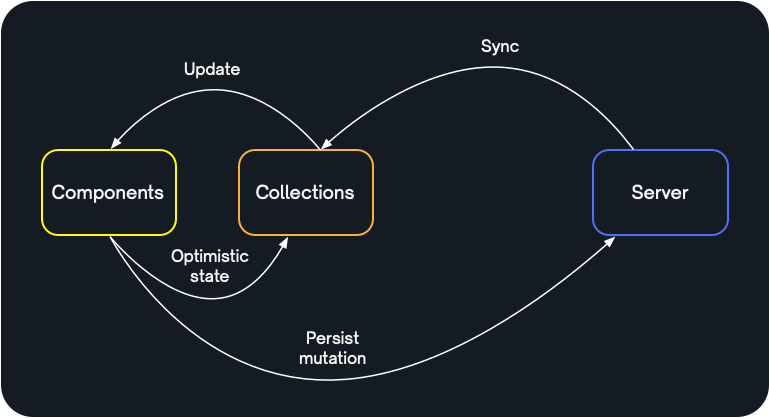
72(This image is from the <a target="_blank" href="https://tanstack.com/db/latest/docs/overview#uni-directional-data-flow">docs</a>.)
73
74### Other syncing strategies
75
76Sometimes Query Collections are too little or too much for a specific use case. Luckily, there are other ones that can cover these situations:
77<a target="_blank" href="https://tanstack.com/db/latest/docs/collections/local-only-collection">`LocalOnly`</a>: For in-memory data
78<a target="_blank" href="https://tanstack.com/db/latest/docs/collections/local-storage-collection">`LocalStorage`</a>: For data stored in local storage
79<a target="_blank" href="https://tanstack.com/db/latest/docs/collections/electric-collection">`Electric`</a>: For real-time sync using Electric's sync engine
80And <a target="_blank" href="https://tanstack.com/db/latest/docs/overview#built-in-collection-types">more</a>!