Read the architecture of a repository
You open a repository that you do not know. You want to make one change, but you do not know where the parts are, or how they connect.
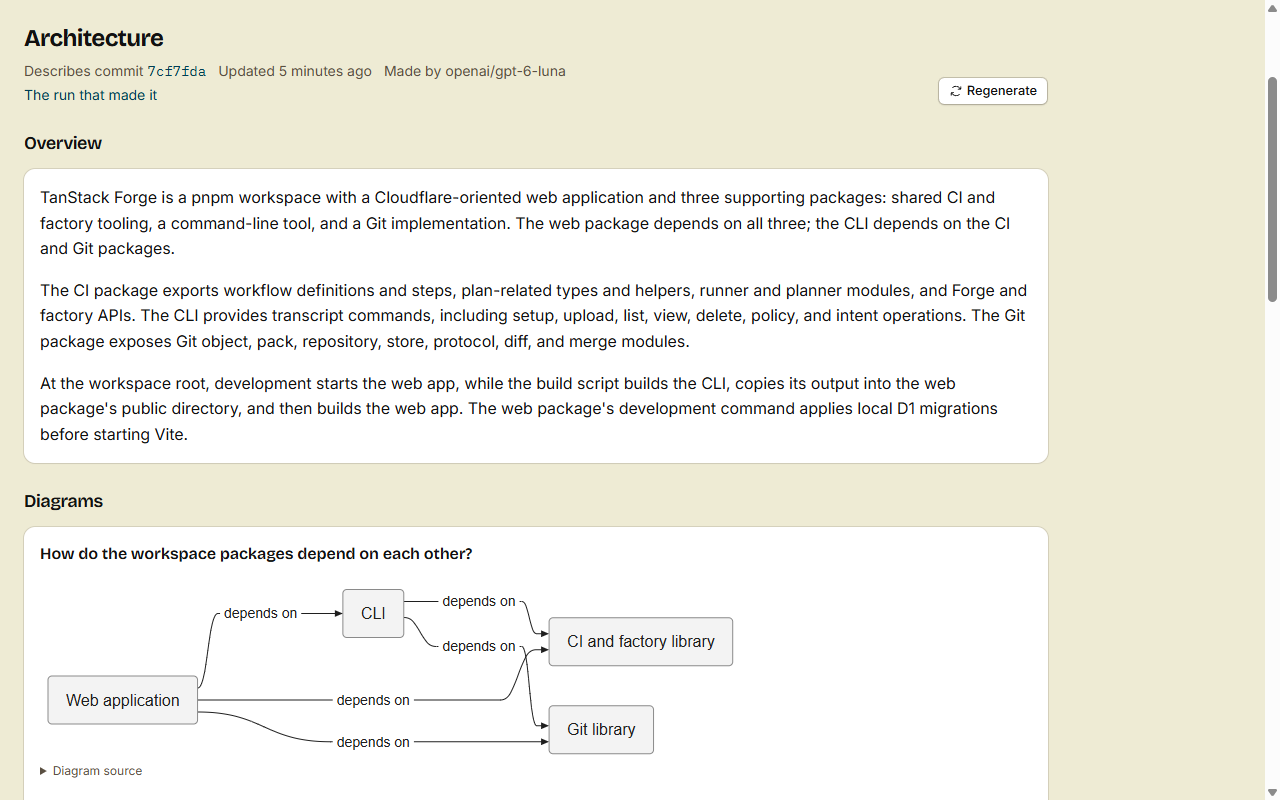
The Architecture tab shows this on one page: an overview, the packages and how they depend on each other, and diagrams that each answer one question. An agent of the software factory writes it from the code of the default branch, and updates it after merges.
1. Open the Architecture tab
Pick one:
- Click the Architecture tab at the top of the repository.
- On the home page of the repository, click View architecture under About.
The address is /<owner>/<repo>/architecture. Everyone who can read the code of the repository can open it.
2. Read the page
The header says which commit of the default branch the page describes, and when it was updated. Below the header, the page has three parts:
- Overview: what the repository does, and its main parts.
- Diagrams: each diagram has a question as its title, for example how a request goes through the parts. The explanation is below the diagram.
- Packages: one card for each package.
Each package card shows:
- The folder of the package. Click it to open the folder.
- What the package does.
- Depends on and Used by. Click the name of a package to go to its card.
- Key files. Click a file to open it.
An AI model wrote the page from the code. Use it as a map, and read the code before you rely on a detail.
3. Find where to make your change
- Find the package that does the job that you want to change.
- Open one of its Key files.
- Read Used by on its card. Your change can break these packages, so test them too.
For admins: keep it up to date
The Architecture agent is on by default. You do nothing, and the tab stays current.
When it updates
The agent runs when a push or a merge moves the default branch. Code looks at the changed paths first:
- No view yet: the agent makes one.
- Only docs, tests, generated files or assets changed: the agent skips the push.
- A package manifest changed, for example
package.json,go.modorCargo.toml, or a file moved to another top-level folder: the agent makes a new view. - Any other change: Cloudflare's decision model
clef-flashsays if the push changes the architecture. The agent runs only for a yes. If the model does not answer, the agent runs.
The agent pushes nothing and posts no comment. The old view stays on the tab until the new one is ready.
How it works
Code reads the new commit first: its folders, its README, the manifest of each package, and the entry file of each package (for example src/index.ts). Then one model call writes the view from that. The model reads no files itself, so a run costs about the same each time.
The header names the model that made the view. People with write access also see The run that made it. It opens the run page, with the log of the agent.
Watch a run, or see why it failed
While a run is queued or going, the tab says A run is going. People with write access see Watch it live. It opens the run page, which shows the log as the model writes: its reasoning, its text and the record it saves. You do not reload the page.
When a run fails or is skipped, the tab says why, for example The last run failed: The agent used its budget of 300000 tokens. or The last run was skipped: Workers AI monthly cap reached. People with write access see See its log.
Every run of every agent is also in the list of runs on the Agents tab. See Watch the factory work.
Make it now
A repository has no view until its next merge to the default branch. You do not have to wait. You need write access.
- Open the Architecture tab.
- Click Generate now. When a view exists, the button is Regenerate.
- When the run ends, reload the page.
Generate now skips the code rules and the decision model. When no run starts, the page says why: the agent is off, a run is queued or running already, or the default branch has no commit.
In a terminal, run src repo architecture --generate.
Turn it off
- Open the repository, then Agents, then Open factory settings (
/<owner>/<repo>/agents/factory). You need admin access. - Find Architecture, and clear Use this agent.
- Click Save Architecture.
An organization owner can turn it off for every repository of the organization, on the organization's Software factory tab.
What it costs
The forge pays for the model. When the forge has an AI Gateway set up (the deploy setting FACTORY_AI_GATEWAY), the agent uses OpenAI's GPT-6 Luna with high reasoning through it. Without one, it uses Workers AI's own GLM model. Its runs count toward the 2,000,000 Workers AI tokens that the forge pays for each user or organization in a UTC month. One run uses at most 300,000 tokens by default.
To change the model or the budget, see Models, keys and triggers.
Read it from your agent
Your coding agent can read the same view before it changes code:
src repo architectureprints it in a terminal. See Install and set up the CLI.- The MCP tool
get_architecture. See Connect over MCP. GET /api/v1/repos/{owner}/{repo}/architecture. See Use the REST API.
Done
The Architecture tab shows a map of the repository: its parts, how they connect, and the files to start from. It updates itself after the merges that change the architecture.