Let your agent ask for a token
Your agent in the terminal (Claude Code, Codex) needs a token to push or to open a pull request. You do not want to paste your own token, with access to everything you can touch.
The agent asks for a token with one command. You check the request in the browser and click Create token. The token works only on the repositories and actions that you allow, and it expires.
1. The agent asks for the token
Tell the agent to run this command, with your repository. src needs no login for it. Install and set up the CLI shows how to install src.
TOKEN=$(src token create -R acme/app --write --expires 2h)src prints a one-time code, and opens the request in your browser. If no browser opens, open the URL that src prints. The command waits until you answer.
--readasks for the read actions. It is the default.--writeasks for the read and write actions.--expirestakes minutes, hours or days, for example30m,2hor7d. The default is1h.
2. Check the request and create the token
- If the forge asks, sign in.
- Make sure that the code on the page is the code in your terminal. If it is not, click Deny.
- Read the request: the name of the program, its IP address and the time of the request. The program chose its name, so nobody checked it.
- Change the token if you want: its name, the repositories, the access and the end time.
- Click Create token. To refuse the request, click Deny.
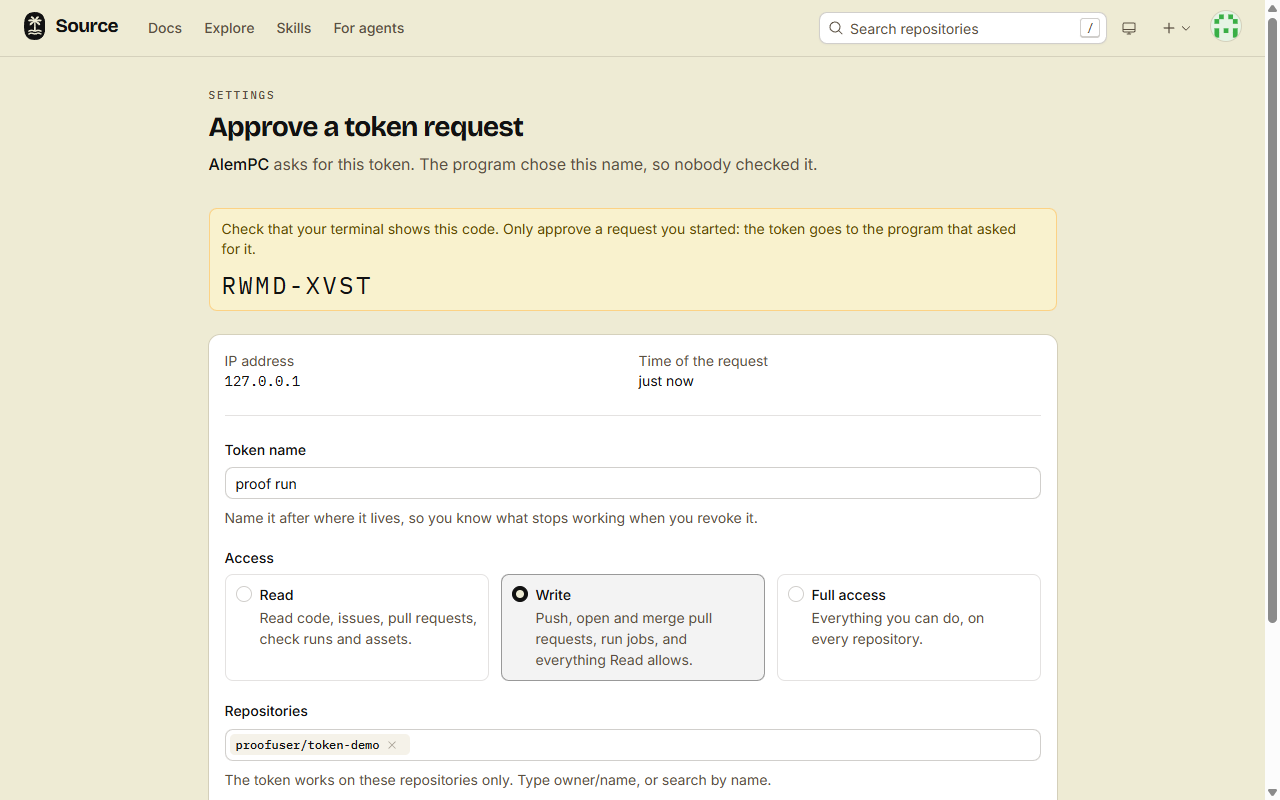
Only approve a request that you started yourself. The token goes to the program that asked for it, not to you.
3. The agent uses the token
src token create prints the token on stdout, and all other text on stderr. So the token is now in $TOKEN, and the terminal does not show it.
For git, the agent sends the token on each command:
git -c http.extraHeader="Authorization: Bearer $TOKEN" clone https://gitflare.t-zlak97.workers.dev/acme/app.gitgit also takes the token as the password, with any user name.
For src, the agent puts the token in SRC_TOKEN:
SRC_TOKEN=$TOKEN src pr create -R acme/app --title "Count down to zero" --body "It stopped at 1."src sends SRC_TOKEN only to its default host. Set SRC_HOST to use another forge.
For the REST API, the agent sends the token as a Bearer token:
curl -H "Authorization: Bearer $TOKEN" https://gitflare.t-zlak97.workers.dev/api/v1/repos/acme/app/issuesDone
Your agent works on acme/app with a token that you checked. The token stops at the end time that you picked, 2 hours in this example. To stop it sooner, click Revoke on it in Access tokens.
What the token cannot do
- Work on a repository that is not in its list, public ones included.
- Do more than you: on each repository, it gets the lower of your role and the role that its actions need.
- Change the access of a repository, or decide on held content.
- Do account-level work:
src auth status, a new repository, agent sessions, skills outside its repositories, and searches across repositories.
An account-level request gets 403 with This token only works on acme/app and cannot do this. For account-level work, use a token with Full access. See Make an access token.
If it fails
failed to get a token via web browser: access_denied: the request was denied. Run the command again.failed to get a token via web browser: context deadline exceeded: nobody answered the request in 15 minutes. Run the command again.This code is not valid or has expiredon the request page: the request is older than 15 minutes, or somebody answered it already. Run the command again.You have read access to acme/app; contents:write needs write: you cannot give a token more than your role. Change the access to Read, or remove the action.