Hidden workflows
Some checks must stay out of reach of the people they check. For example, a check that the license stays MIT. A file in .source/workflows/ is in git, so everyone who reads the repository can read it, and a pull request can change it.
A hidden workflow is a workflow file that the forge keeps in the vault, for admins only. It runs next to the workflows of the repository. Contributors see only its result, a summary, and a command to reproduce it.
You need admin access to the repository, and src, logged in.
1. Write the workflow file
Use the same format as the files in .source/workflows/ (see Your first workflow). Keep the file out of the repository, for example in ~/hidden/license.ts:
import { defineWorkflow, pullRequest } from '@tanstack-source/ci'

export default defineWorkflow('license', { on: [pullRequest({ branches: ['main'] })] }).job('check', {
  steps: [{ name: 'Check the license', run: 'grep -q "MIT License" LICENSE' }],
})
A hidden workflow gets no egress, so its jobs cannot download packages.
2. Save it
In a clone of the repository, run:
src hidden-check set license \
  --script-file ~/hidden/license.ts \
  --repro-command 'grep "MIT License" LICENSE' \
  --failure-summary 'The license must stay MIT.' \
--success-summary 'The license is MIT.'- The name uses lowercase letters, digits and dashes.
- Contributors see the repro command and the summaries.
- Add
--fixablewhen contributors can make the check pass on their own.
In the browser, open the repository, then Settings. Under Hidden workflows, fill in the form, and click Save hidden workflow.
3. See it next to the other workflows
Open the folder .source/workflows/ of the repository. The hidden workflow shows there as license.ts, with a lock icon and a Hidden workflow badge. Only admins see it.
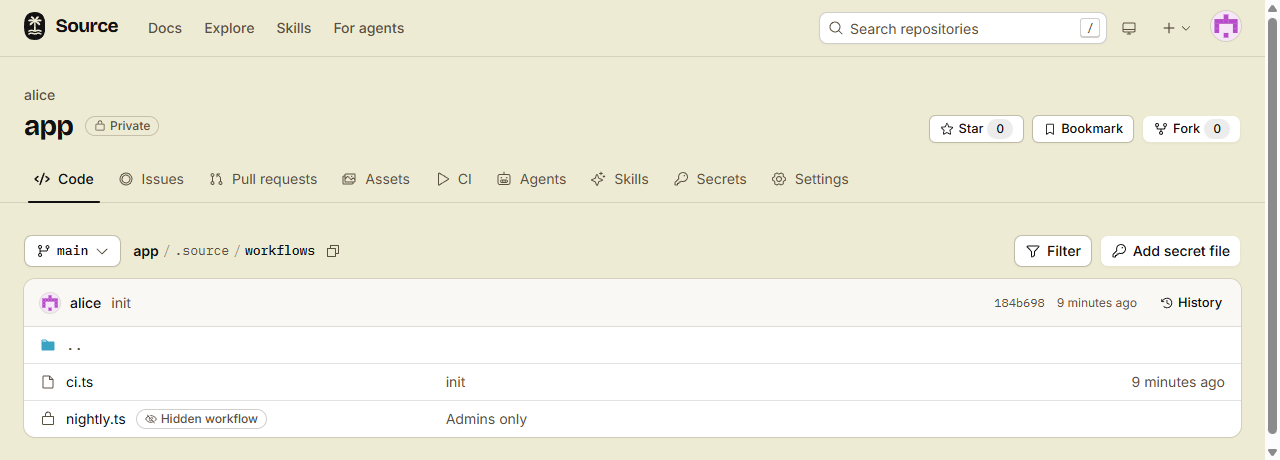
- Click
license.ts. The vault file page opens. - Click Reveal to read the file.
To change the file, run src hidden-check set again, or save it again under Hidden workflows in Settings. To delete it, run src hidden-check delete license.
4. Make sure that it runs
The forge checks the file on the next push or pull request. If the file has errors, Hidden workflows in Settings shows them under "It does not run".
To block a merge until it passes, add its job to a branch rule as hidden:license/check. See Hidden checks as required checks.
Done
The check runs on each pull request into main. You see the file next to your other workflows. Contributors see only whether it passed, and how to reproduce it.
What a hidden workflow cannot do
- It gets no egress and no permission to write. See Permissions.
- It sends no
fixup()and saves no cache. - Its file, logs, findings and artifacts are for admins only.