Keep private files out of git
Your .env file and your local keys must not go into git. By default, the forge refuses a push that adds a .env file. But each new clone needs those files, and you do not want to send them around in chat.
The vault keeps these files encrypted on the forge, next to the repository. src vault put saves a file there, and src vault pull writes the files back into a clone.
You need src, logged in. To save a file, you also need write access to the repository.
1. Save a file
In your clone, run:
src vault put .envOnly you can read this file. src keeps its path from the top folder of the working tree, so .env comes back as .env.
To save a file at another path in the repository, add --path:
src vault put ~/team/api.env --path apps/api/.envThe file now comes back as apps/api/.env.
2. Share a file with your team
Give a scope:
src vault put config/dev.json --scope role:readEveryone who can read the repository now gets config/dev.json. See Who gets a file for the other scopes.
3. Get the files in a new clone
git clone https://gitflare.t-zlak97.workers.dev/<owner>/<repo>.git
cd <repo>
src vault pull
Each file goes back to its path. To look at your files, run src vault list. To delete one, run src vault delete .env.
4. See the files in the repository
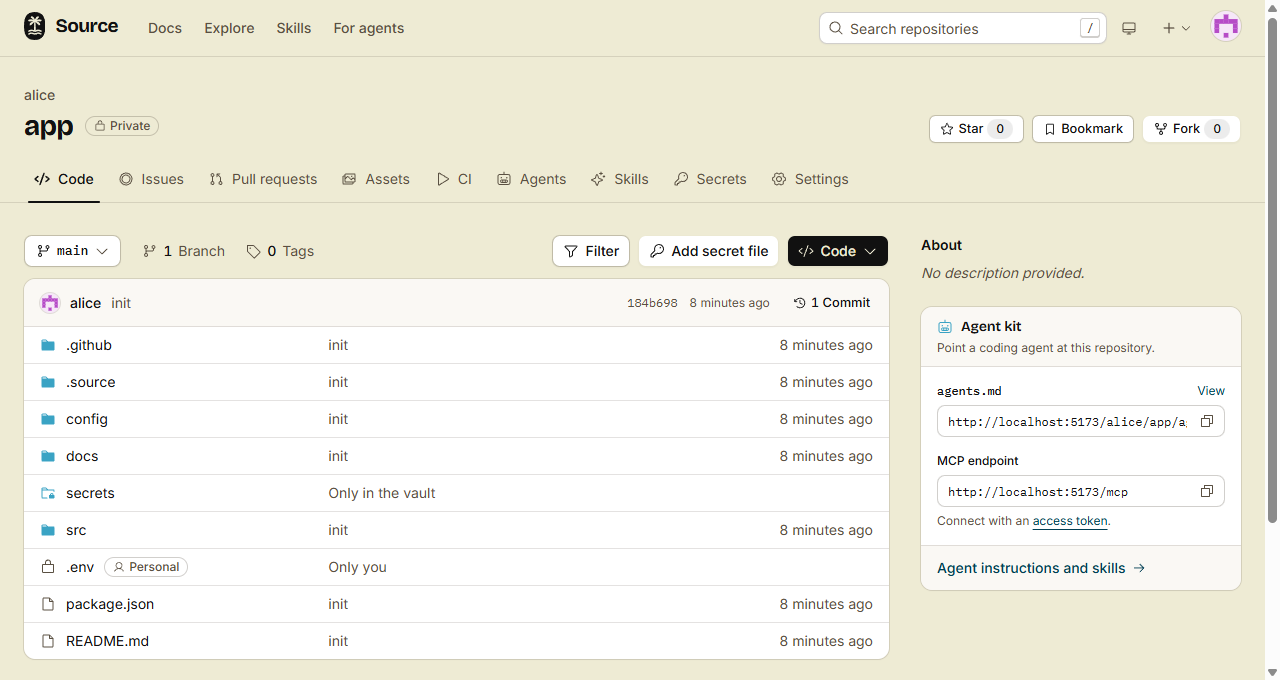
Open the repository on the forge. The file list shows the vault files that you can read, at their paths, next to the files of git. The vault is the same on every branch, so they show on every branch and tag.
- A lock icon: a vault file. Its badge is Personal (only you) or Shared (a role). The next column says who gets it.
- A folder with a lock: a folder that only the vault has. The next column says "Only in the vault".
- Vault file not used: git tracks a file at this path, so a pull does not write the vault file. Click the badge to open the vault file.
At each path, you see only the file that a pull gives you. People who are signed out, or who cannot read the vault, see no vault files.
Done
A new clone is ready to run after one src vault pull, and no secret is in git. Your team sees each shared file in the folder where it goes.
In the browser
- Open the repository, and go to the folder where the file goes.
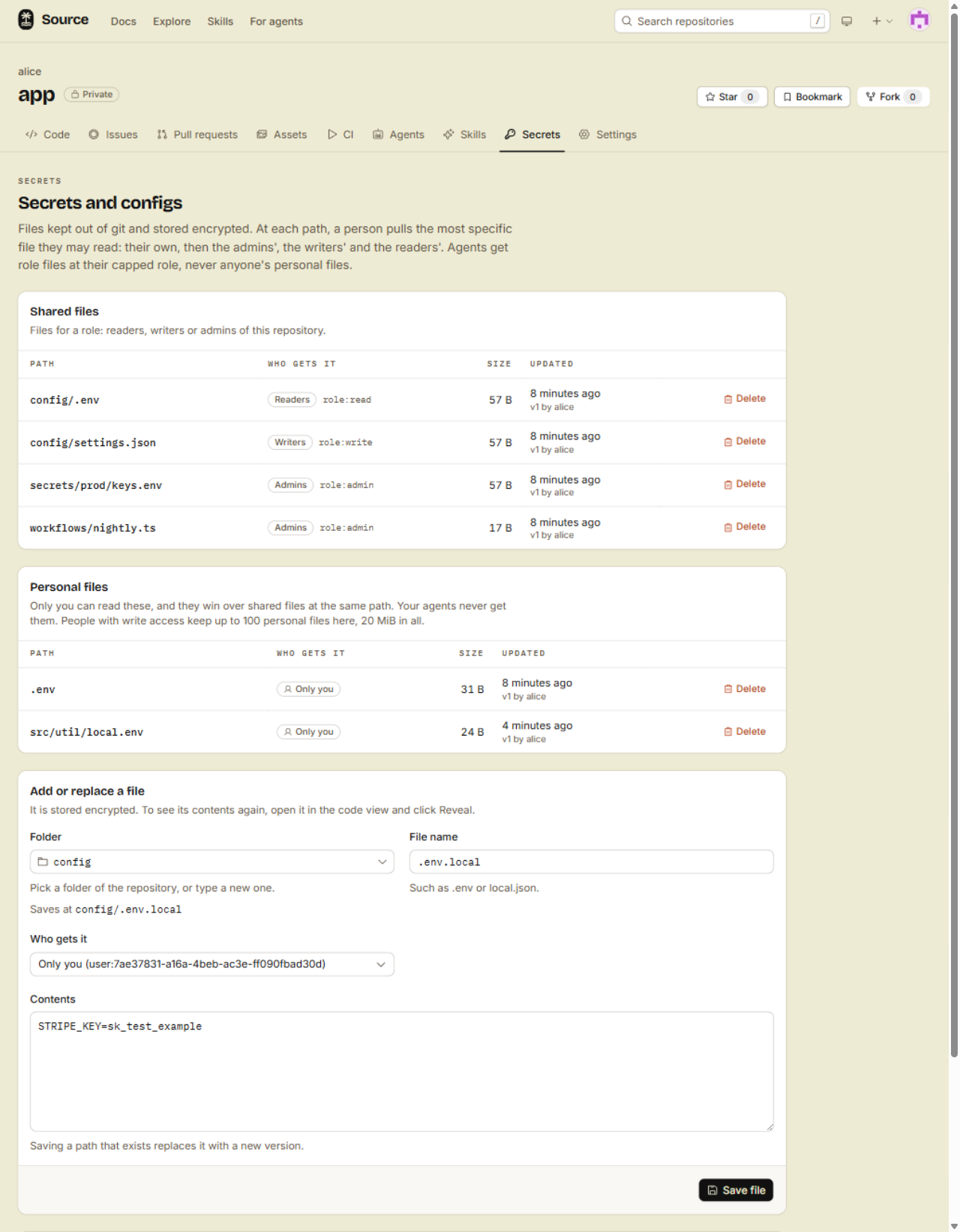
- Click Add secret file. The Secrets tab opens, with that folder in Folder.
- Type the File name, for example
.env. Saves at shows the full path. - Pick Who gets it, and paste the Contents.
- Click Save file.
You see Add secret file only when you can save a vault file in the repository. On the Secrets tab, you can also pick another folder from the list, or type a new folder.
Read a file in the browser
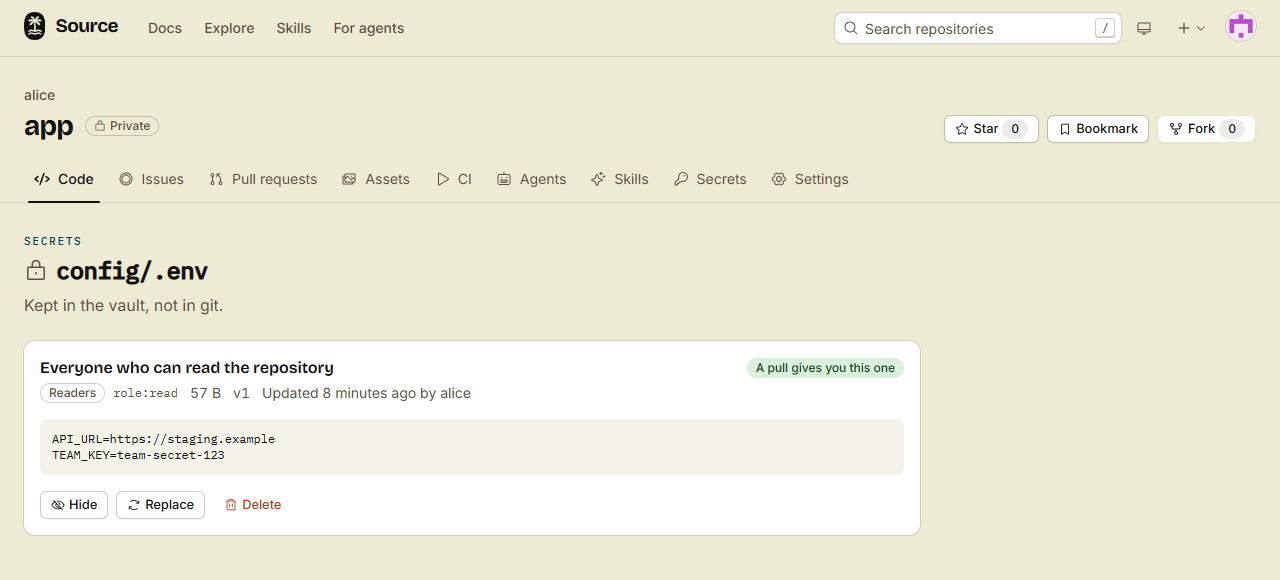
- In the file list, click a vault file. Its page shows each file that you can read at this path, and the one that a pull gives you.
- Click Reveal to show the contents. Click Hide to hide them again.
The forge keeps a record of each Reveal, the same as for a pull. If you can save files of that scope, the page also has Replace and Delete.
Who gets a file
| Scope | Who can read it | Who can save it |
|---|---|---|
user:me (the default) | Only you | You, with write access |
role:read | Everyone who can read the repository | Writers and admins |
role:write | People with write access | Admins |
role:admin | Admins | Admins |
- The most specific file wins. When two scopes have a file at the same path, a pull gives you your own file first, then the admins', the writers' and the readers'.
- Public repositories refuse
role:read, because everyone who is signed in can read them. - Agents get role files at the role of their session. They never get anyone's personal files.
How a pull keeps your work safe
- It never writes over a file that git tracks.
- It never writes into the
.gitfolder. - It writes over an untracked file with other content only with
--force. - It names each file that it did not write, writes the others, and exits 1.
Limits
- A file is at most 5 MiB.
- Each person keeps at most 100 personal files in one repository, 20 MiB in all.