Issue agents
Your issue list grows faster than you can read it. Half of the new issues are duplicates, some are fixed already, and the bug reports have no repro. You want agents to close the duplicates, reproduce the bugs, and open a pull request with a fix.
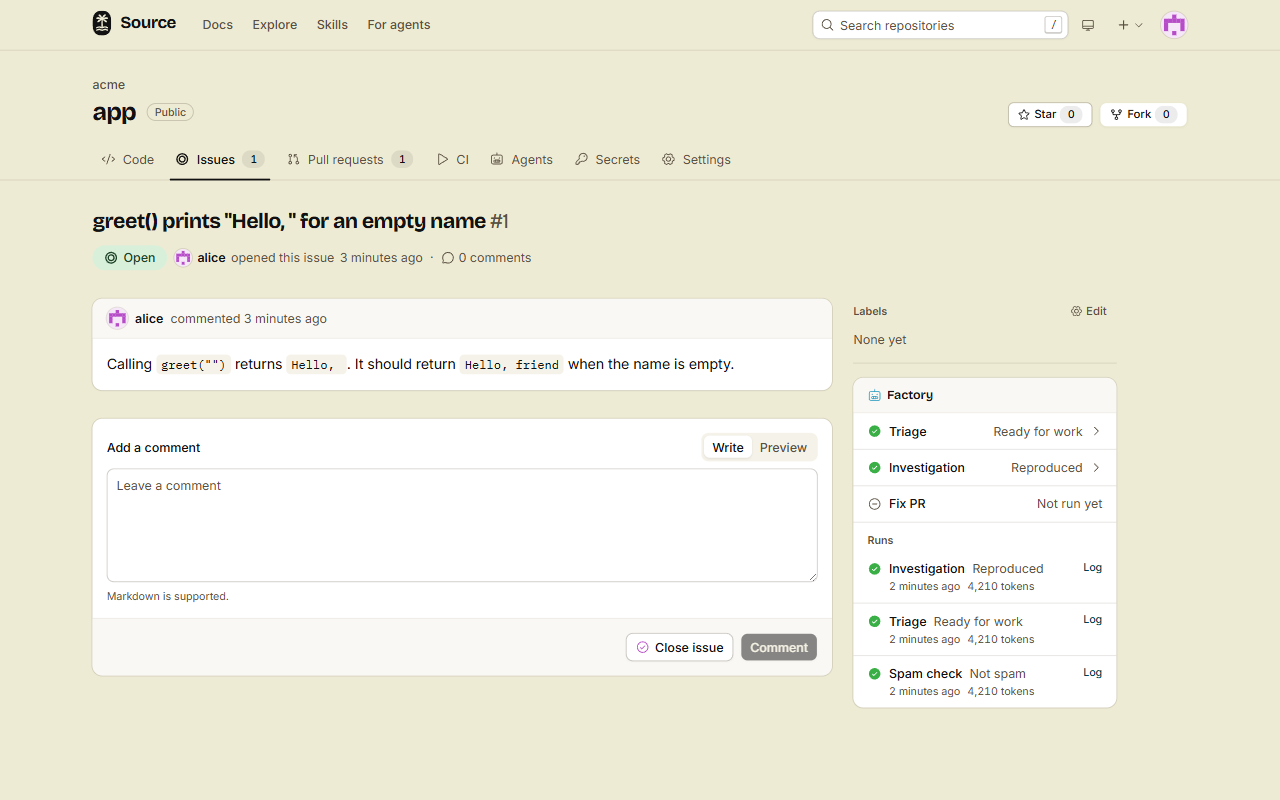
The factory has three issue agents:
- Triage finds duplicates, issues that are fixed already, and unclear issues.
- Investigate reproduces a bug in a sandbox and saves the repro.
- Auto PR fixes a reproduced bug and opens a pull request.
Each agent is off until an admin turns it on. When an agent is on, it works like this by default:
- Triage only comments.
- Investigate runs for authors with triage access or more.
- Auto PR waits for a label.
1. Let triage close duplicates
- Open Agents, then Open factory settings.
- Under Triage, select Use this agent.
- Set Mode to Act.
- Click Save Triage.
Triage now acts on each new issue:
| Verdict | The panel shows | In the mode Act | In the mode Suggest |
|---|---|---|---|
duplicate | Triage: Duplicate | Comments with the link to the original, and closes the issue as a duplicate. | Comments with the link. |
fixed | Triage: Already fixed | Comments with the link to the fix, and closes the issue as completed. | Comments with the link. |
unclear | Triage: Needs more information | Asks the author one question, and adds the label needs-info. | Asks the author one question. |
ok | Triage: Ready for work | Does nothing. | Does nothing. |
In the mode Act, an issue with needs-info closes after 7 days when its author does not comment. The bot closes it as not planned, with a comment that says why. Change the number of days with Days to wait on needs-info in the settings.
2. Reproduce a bug
- Under Investigate, select Use this agent.
- Click Save Investigate.
Investigate now runs by itself on issues from people with triage access or more. For an issue from anyone else, add the label factory:investigate.
The agent reads the issue, writes the smallest repro that it can, and runs it in a sandbox on the default branch. Then it posts one comment with the result, the repro and the files it suspects.
| Verdict | The panel shows | Meaning |
|---|---|---|
reproduced | Investigation: Reproduced | The repro shows the problem. The factory saves it. |
not-reproduced | Investigation: Not reproduced | The repro ran, and the code works correctly. |
unclear | Investigation: Unclear | The issue does not say enough, or the repro does not run. |
The saved repro is used again by the fixes-the-issue check of each pull request that says fixes #N.
3. Get a fix pull request
- Under Auto PR, select Use this agent.
- Click Save Auto PR.
- Add the label
factory:fixto the issue.
You can add the label at once: Auto PR waits until an investigate run reproduced the issue.
The agent runs the saved repro and sees it fail. Then it fixes the code, turns the repro into a regression test, and runs the tests. Last, it opens a pull request from the branch factory/issue-<n> into the default branch. The body starts with Fixes #<n>.
| Verdict | The panel shows | Meaning |
|---|---|---|
opened | Fix PR: Pull request opened | The verdict has the number of the new pull request. |
could-not-fix | Fix PR: Could not fix | The repro still fails, or the pull request did not open. |
no-repro | Fix PR: No repro | No investigate run reproduced the issue. |
4. Review the fix
The new pull request goes through screening first, as a pull request from a person without write access does. Then it gets the full pull request steps, the audit too. The issue text can try to steer the fix, so the audit reads it as it reads any other change.
Review it and merge it as you merge any other pull request.
Done
Triage closes duplicates and fixed issues, and asks authors for what is missing. A bug with the label factory:fix gets a repro, a fix, a test and a pull request that says Fixes #<n>.
Good to know
- Each issue agent runs once on an issue.
- The agents never read content that screening holds.
- To start investigate or Auto PR in another way, change Who starts it in the settings. For example, set Auto PR to Everyone to fix every reproduced issue.
- The comments of the agents are signed "TanStack Source bot", with the name of the agent.
- On a monorepo, the agents read every member, and Auto PR opens one monorepo pull request across the members that it changed. See Give an agent a monorepo.