Make an access token
A script, a CI job or a tool needs a token for the forge. A token with all of your access is a big risk if it leaks.
Give the token only the repositories and the actions that it needs, and an end time.
1. Open the tokens page
Click your avatar, then Access tokens under Agents and access. The page is also at Settings, Tokens.
2. Name the token and pick its access
- Type a Token name for the place where the token lives, for example
ciorlaptop. - Pick the Access:
- Read: reads code, issues, pull requests, check runs and assets.
- Write: pushes, opens and merges pull requests, runs jobs, and all that Read does.
- Full access: all that you can do, on every repository.
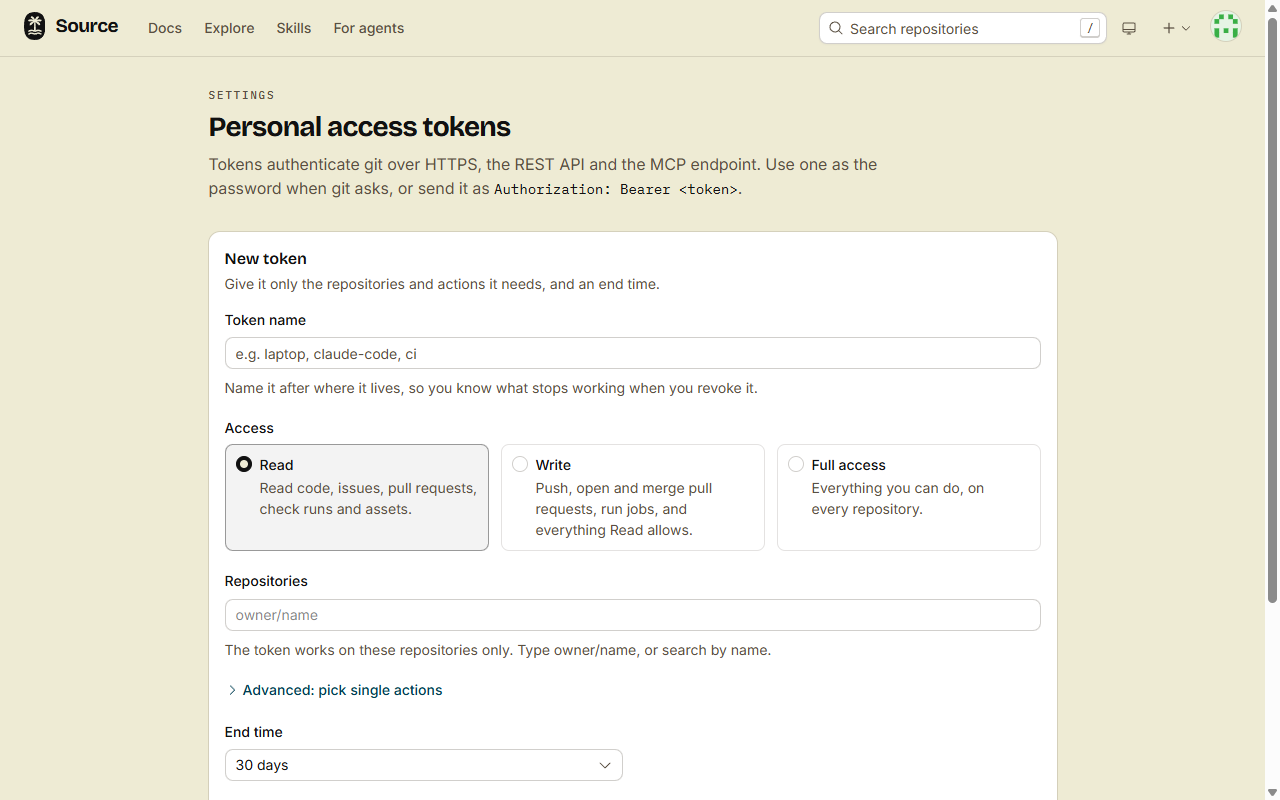
3. Add the repositories
Under Repositories, type each repository as owner/name, or search by name. The token works on these repositories only. It does not work on other repositories, public ones included.
Full access has no list of repositories.
A token on a monorepo also works on its members. A member that is added later is in, and a member that is removed drops out at the next request.
4. Pick the end time
Pick the End time: from 1 hour to 90 days, or On a date. The default is 30 days.
- A token with repositories lives 365 days at most.
- No expiry is there only for Full access. Such a token can do all that you can do, with no end.
5. Create the token
- Click Create token.
- Copy the token now. The page shows it one time only.
Use the token as the password when git asks, or send it as Authorization: Bearer <token>.
Done
The token is in Your tokens, with its repositories, its access and its end time. It works on git over HTTPS, the REST API, MCP and src, on those repositories only.
Later: pick single actions
Read and Write are sets of actions. For a different set, open Advanced: pick single actions and select the actions one by one.
For example, Read does not include vault:read, because the vault keeps private files. Select it here when the token must read the vault.
A token never gets repo:admin or held:review. Changes to the access of a repository, and decisions on held content, are for people in the browser only.
Later: revoke a token
- In Your tokens, click Revoke on the token.
- Click Revoke token.
Everything that uses the token stops at once: git, the REST API and MCP clients. You cannot undo this.
What "Expired" means
After its end time, a token shows Expired in Your tokens, and it stops working. git, the REST API and MCP refuse it. The REST API answers 401 with This access token has expired. Make a new token.
Seven days after the end time, the token leaves the list.
If it fails
You have read access to acme/app; contents:write needs write: you cannot give a token more than your role on a repository. Remove the action, or ask an admin of the repository for a higher role.This token only works on acme/app and cannot do this: a token with repositories cannot do account-level work. That includessrc auth status, new repositories, agent sessions, skills outside its repositories, and searches across repositories. Use a Full access token for this work.
On each repository, a token never does more than you. When your role there goes down, the token loses that access too.