Models, keys and triggers
You run the factory for an organization or a repository. You want a better model for the review, your own model key, a token budget for each run, and control over who starts each agent.
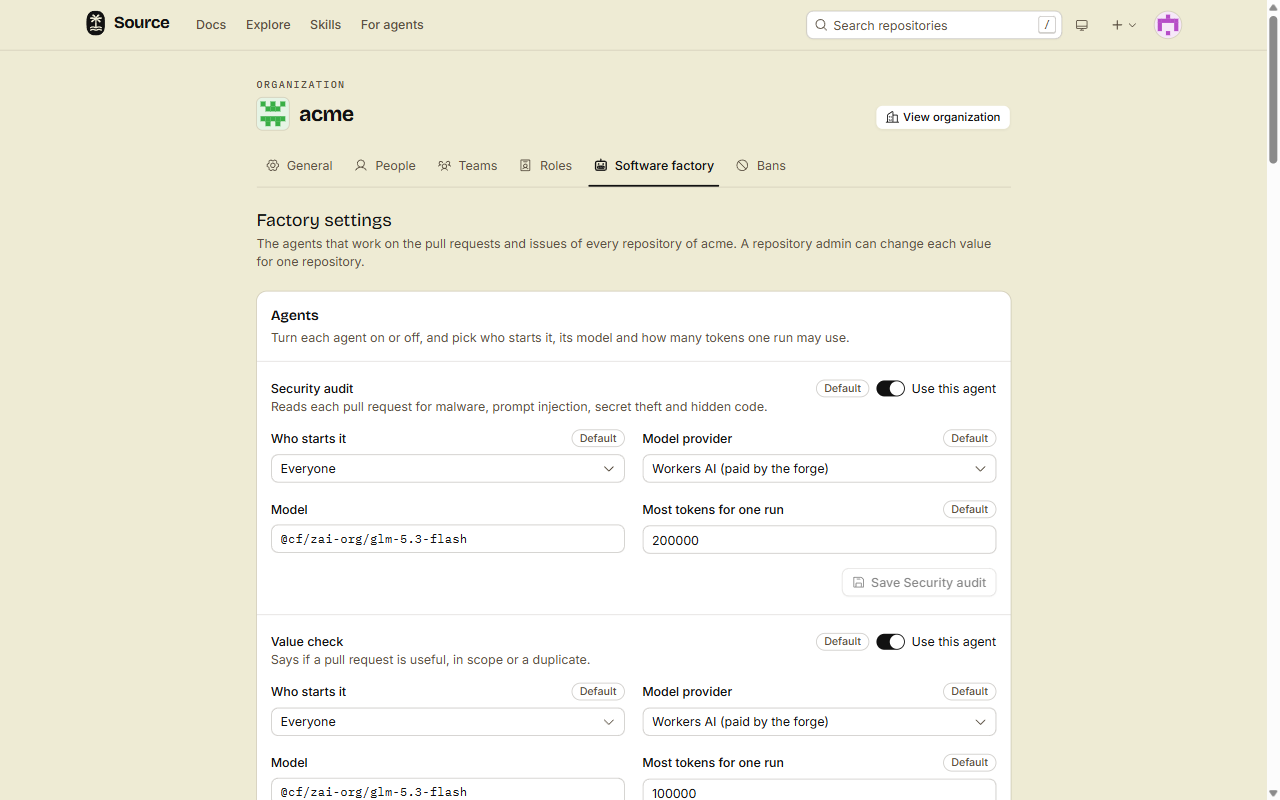
The factory settings are on the forge, not in git. A pull request cannot change them. An organization sets values for all of its repositories, and each repository can change any value for itself.
Where the settings are
| Settings of | Page | Who can change them |
|---|---|---|
| An organization | /organizations/<org>/factory, the Software factory tab | The owners of the organization |
| A repository | /<owner>/<repo>/agents/factory, from Agents, then Open factory settings | The admins of the repository |
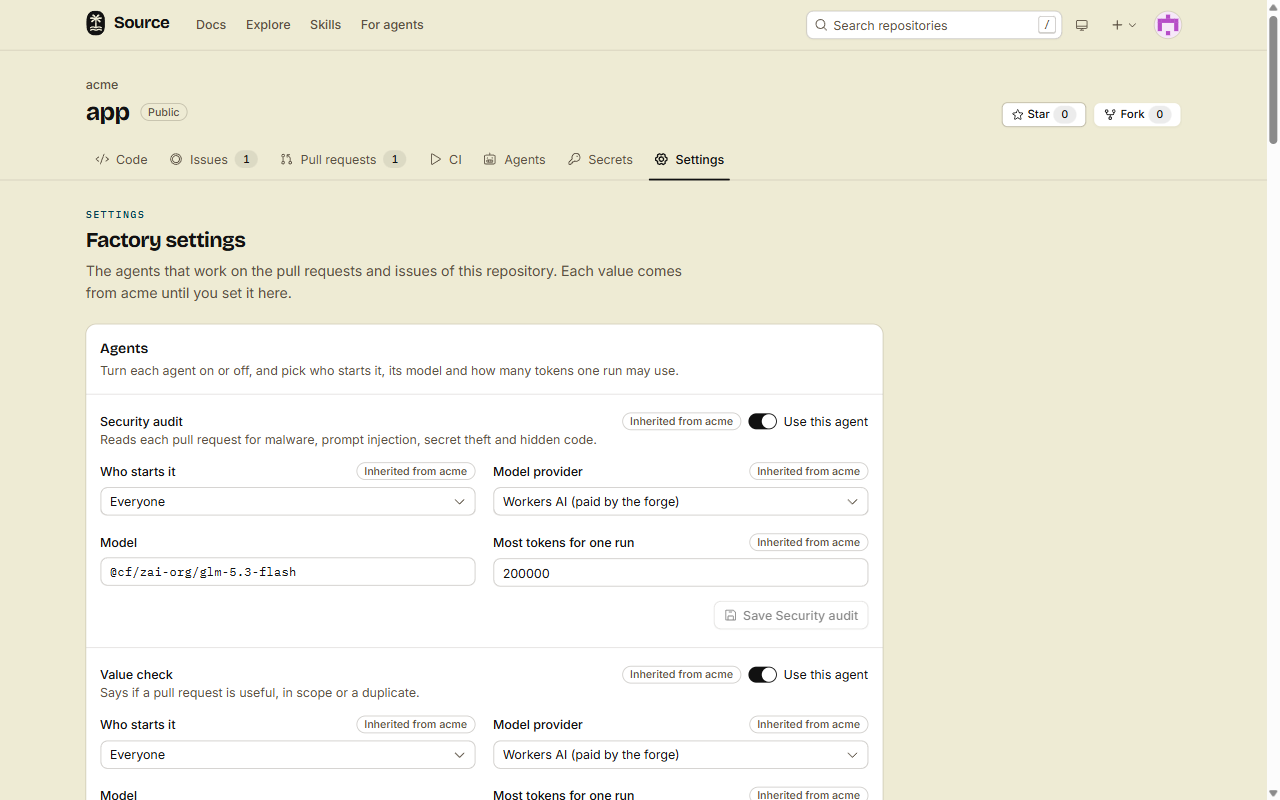
Each value on the repository page shows where it comes from:
- Default, or Inherited from and the name of the organization: you did not set it here.
- Set on this repository: you set it here. Click Use the org value (or Use the default) to remove it.
1. Pick who starts each agent
Each agent has Who starts it:
| Choice | The agent runs for |
|---|---|
| Off | Nobody. |
| When an item has a label | Issues and pull requests that have the label that you type. |
| Authors with a role or higher | Authors with this role or a higher one: read, triage, write, maintain or admin. |
| Everyone | Every author. |
Use this agent turns the agent on or off for all authors. The Security audit, Architecture and PR impact are on by default. Every other agent is off by default.
Some rules are not settings. They hold whatever you pick:
- For an author without write access, the fixer and the conflict fixer run only after a clean audit.
- While investigate is on, the label
factory:investigatestarts it on an issue, whatever its trigger. - Who starts it does not change when Architecture runs. Only a push or a merge to the default branch starts it, or a person who clicks Generate now.
The two agents on by default that are not checks
These two agents only describe the code. They never hold back a pull request, and they push nothing.
| Agent | What it does | When it runs | Where you see it |
|---|---|---|---|
| Architecture | Writes an overview, a card for each package and diagrams of the repository | After a push or a merge to the default branch that changes the architecture | The Architecture tab of the repository. See Read the architecture of a repository. |
| PR impact | Says if a pull request changes the architecture or the public API, and how | When a pull request opens, and on each push to it. Who starts it applies | The Impact tab of the pull request. See Read the Impact tab. |
Before each run, code and Cloudflare's decision model clef-flash decide if the change needs one. A change to only docs, tests, generated files or assets starts no run.
2. Pick a model
Each agent has a Model provider and a Model. The default is Workers AI with the model @cf/zai-org/glm-5.3-flash, which the forge pays for.
Architecture and PR impact read a whole pull request or repository in one call. When the forge has an AI Gateway set up, their default is OpenAI's GPT-6 Luna (openai/gpt-6-luna on Workers AI) with high reasoning, which the forge also pays for. You can type another Workers AI model name the same way, for example another provider/model from the AI Gateway catalog. Settings that you saved before keep the model that you saved.
The providers are:
- Workers AI (paid by the forge, no key)
- Anthropic, OpenAI, OpenRouter, Grok, Mistral
- Amazon Bedrock, Vercel AI Gateway, Lovable AI Gateway
Type the model name of the provider, for example claude-sonnet-4-5 for Anthropic. The forge calls the host of the provider. You cannot send a model call to another host.
3. Add a model key
Every provider but Workers AI needs a key.
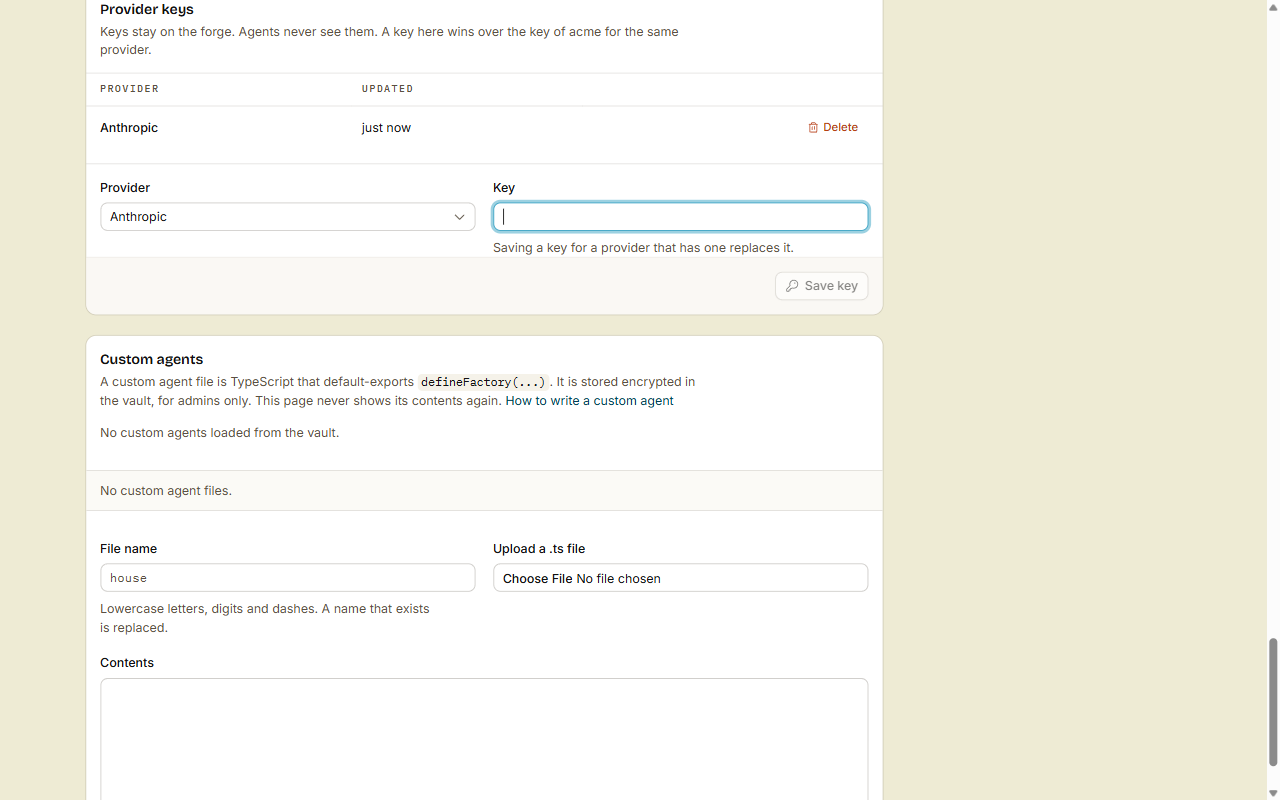
- On the factory settings page, go to Provider keys.
- Pick the Provider, and paste the Key.
- Click Save key.
A key stays on the forge:
- Nobody can read a key back, not even an admin. The page shows only the provider and when you saved it.
- The model runs on the forge. The agent's sandbox never gets the key.
- A repository key wins over the organization key for the same provider.
- An organization key is for every repository of the organization that has no key of its own.
If an agent uses a provider that has no key, its runs fail with "There is no ... key". The message names the provider and the repository.
4. Set a budget
Most tokens for one run stops an agent when it uses this many tokens. The run shows Failed, with the reason. Use a whole number from 1 to 2,000,000.
| Agent | Default tokens for one run |
|---|---|
| Security audit | 200,000 |
| Value check | 100,000 |
| Fixes-the-issue check, review, investigate, Architecture | 300,000 |
| PR impact | 200,000 |
| Fixer, Auto PR, CI self-heal | 500,000 |
| Conflict fixer | 200,000 |
| Triage | 50,000 |
| Spam | 30,000 |
The forge pays for 2,000,000 Workers AI tokens for each user or organization in a UTC month. After that, runs on Workers AI are skipped with "Workers AI monthly cap reached". Runs on your own key do not count.
5. Set the rules for all agents
The card Rules for all agents has the settings of the whole factory:
| Setting | Default | Range |
|---|---|---|
| Auto-merge | Off | On or off. See Ready to merge. |
| Runs per author each day | 20 | 1 to 1,000. For authors without write access. |
| Review rounds | 3 | 1 to 10. How many times the fixer runs for one push. |
| Days to wait on needs-info | 7 | 1 to 365. See Issue agents. |
| Ban policy, A ban applies to | Ban only on hard proof, the repository only | See Spam and bans. |
| Custom agents come from | The vault | See Custom agents. |
| Secrets for the package install | None | The CI secrets that the install of .source/factory.ts can use, for a private package registry. See A private package registry. |
Click Save rules.
Done
Each agent runs with the model, the budget and the trigger that you picked. Your model keys stay on the forge.
With the CLI
The src CLI has the same settings. Repository admins and organization owners can use it. Add --org <org> to act on an organization, not on the repository of the current folder.
src factory settings
src factory set-key anthropic < anthropic-key.txt
src factory keys
src factory configure --file change.json
set-key reads the key from standard input, so the key stays out of your shell history. To remove a key, run src factory delete-key anthropic.
change.json holds only the fields that you change. null removes a value, so the inherited value holds again. This change turns the review on, moves it to Anthropic and to the mode Fix to ready, and removes the repository's own Review rounds:
{
  "agents": {
    "review": {
      "enabled": true,
      "mode": "fix-to-ready",
      "model": { "provider": "anthropic", "model": "claude-sonnet-4-5" },
      "budget": { "maxTokens": 400000 }
    }
  },
  "reviewRounds": null
}
The fields and the routes are in Install and set up the CLI, Use the REST API and Connect over MCP.