The pull request steps
The Factory panel on a pull request says "Needs a maintainer", or a run says "Could not fix". You want to know what each step does, in which order, and what each verdict means.
The factory runs the steps below on each pull request that people can see. Each step runs only while its agent is on: see Turn on the agents. The steps run again after each push by a person. The factory's own pushes get their own audit and review.
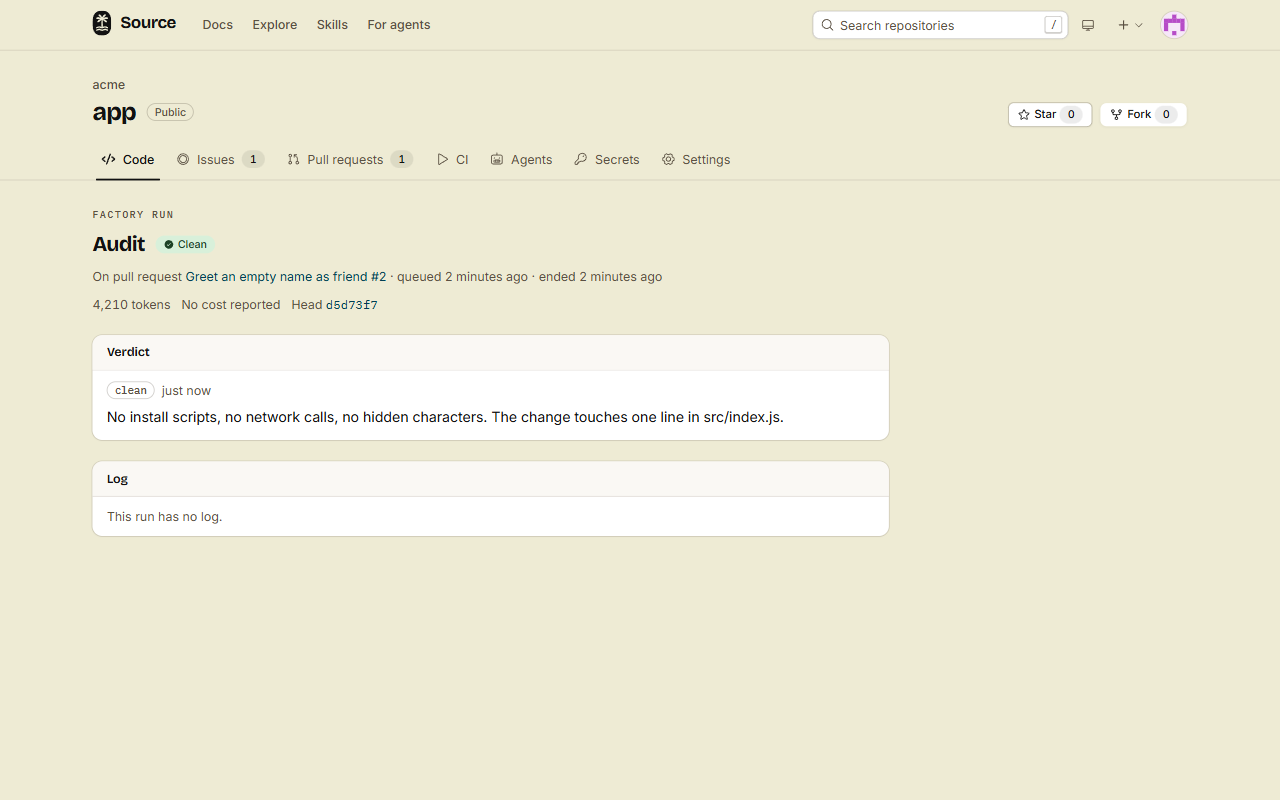
People with write access can click Log on a run in the panel. The run page shows the agent, the head commit, the tokens, the verdict and the log of the run.
The order
- Security audit. Every other step waits for its verdict.
- Value check and fixes-the-issue check, after a clean audit.
- Review, after a clean audit.
- Fixer, when the review has findings and its mode is Fix to ready.
- Conflict fixer, when the pull request conflicts with its base.
- Ready to merge: a comment, and a merge when you turned on auto-merge.
CI self-heal does not wait for this order. It starts when a CI run on the pull request fails.
PR impact does not wait for this order either, and nothing waits for it. See Read the Impact tab.
If the audit is off, the other steps start without it. Then the factory posts no "ready to merge" comment and never merges.
1. Security audit
The audit only reads. It looks for malware, install and build-script tricks, changes to CI and to .source/, secret theft, prompt injection aimed at agents, and hidden code.
| Verdict | The panel shows | What happens next |
|---|---|---|
clean | Safe: Clean | The other steps start. |
suspicious | Safe: Needs a maintainer | The factory stops, and adds the label factory:needs-maintainer. |
malicious | Safe: Malicious | The factory stops, adds the label factory:malicious, and starts the spam agent when it is on. |
For suspicious and malicious, the audit posts one short comment for the maintainers: what it found, and where. An audit that fails gives no verdict, so the factory stops too.
When the factory stops, the panel says "The factory stopped. A maintainer needs to look at this pull request." Read the change yourself. The next push by a person starts a new audit.
2. Value check
The value check reads the change, the docs of the project, and the titles of its issues and pull requests.
| Verdict | The panel shows | Meaning |
|---|---|---|
useful | Useful: Useful | The project wants it, and no open pull request does the same. |
unclear | Useful: Unclear | The agent cannot tell what it is for, or if the project wants it. |
duplicate | Useful: Duplicate | An open pull request does the same. The verdict links it. |
out-of-scope | Useful: Out of scope | The project does not do this. |
When the verdict is not useful, or the agent found related items, it posts one short comment with the links.
3. Fixes-the-issue check
This step runs only when the title or the body of the pull request links an issue of the same repository with a closing word: fixes #12, closes #12 or resolves #12.
The agent runs a repro on the base, then on the head. It uses the repro that the investigate agent saved for the issue. If there is none, it writes one from the text of the issue.
| Verdict | The panel shows | Meaning |
|---|---|---|
fixes | Fixes the issue: Fixes #12 | The repro fails on the base and passes on the head. |
does-not-fix | Fixes the issue: Does not fix | The repro fails on the base and on the head. |
could-not-reproduce | Fixes the issue: Could not reproduce | The repro does not fail on the base, or it does not run. |
no-linked-issue | Fixes the issue: No linked issue | The agent found no issue that it can read. |
4. Review
The review posts one review with a note on each line that has a real finding: a bug, a security problem, or a missing test. It never approves and never asks for changes. A person does that.
| Verdict | Meaning |
|---|---|
findings | The agent posted a review with findings. |
no-findings | The agent found no real problem. It posts no review. |
The review has two modes:
- Post findings (the default): you read the review and decide what to change.
- Fix to ready: the fixer fixes the findings for you.
5. Fixer
The fixer runs in the mode Fix to ready, after a review with findings. It fixes the findings and the failing checks, runs the tests near its change, and pushes one commit to the head branch. Then it posts a comment that says what it changed.
| Verdict | Meaning |
|---|---|
fixed | The fixer pushed a commit. |
nothing-to-fix | There were no findings and no failing checks. |
could-not-fix | The tests still fail, or the head moved. It pushes nothing. |
The fixer's commit gets a new audit and a new review. The fixer runs at most 3 times for one push by a person. Change this number with Review rounds in the settings.
6. Conflict fixer
When the pull request conflicts with its base, the conflict fixer merges the base into the head. It makes a merge commit and never force-pushes. It also runs when the base branch moves and the pull request conflicts after that.
| Verdict | The panel shows | Meaning |
|---|---|---|
resolved | Conflicts: Resolved | It pushed a merge commit. |
no-conflicts | Conflicts: No conflicts | The merge had no conflicts. |
could-not-resolve | Conflicts: Could not resolve | It cannot keep the changes of both sides, the tests fail, or a branch moved. It pushes nothing. |
7. CI self-heal
A CI run on the pull request failed, and you want the cause fixed without reading the log yourself.
When a CI run on the pull request fails, CI self-heal does these steps:
- It reads the logs and the findings of the failed jobs.
- It reproduces the failure in its sandbox.
- It fixes the root cause. It never makes a test pass by weakening the test or deleting it.
- It runs the failing commands again.
- It pushes one fix to the head branch, and posts a comment that says what it changed.
| Verdict | Meaning |
|---|---|
fixed | It pushed a fix to the head. |
could-not-fix | It did not find the cause, or the failing commands still fail. It pushes nothing. |
not-a-code-problem | The cause of the failure is not in the code. It pushes nothing. |
nothing-to-fix | It found no failure to fix. |
Its fix gets a new audit and a new review, as the fixer's commit does. For each push by a person, CI self-heal runs at most Review rounds times (3 by default, in the settings). It works only on a failed run of the pull request's current head.
It never reads a hidden workflow, and never runs for one. The logs of a hidden workflow are for admins only.
CI self-heal works on pull requests only. A failed run on the default branch gets no fix from it.
Read the Impact tab
A large pull request can change how the parts of the project connect, or break the code of the people who use it. You want to know that before you read the diff, so you review those pull requests with more care.
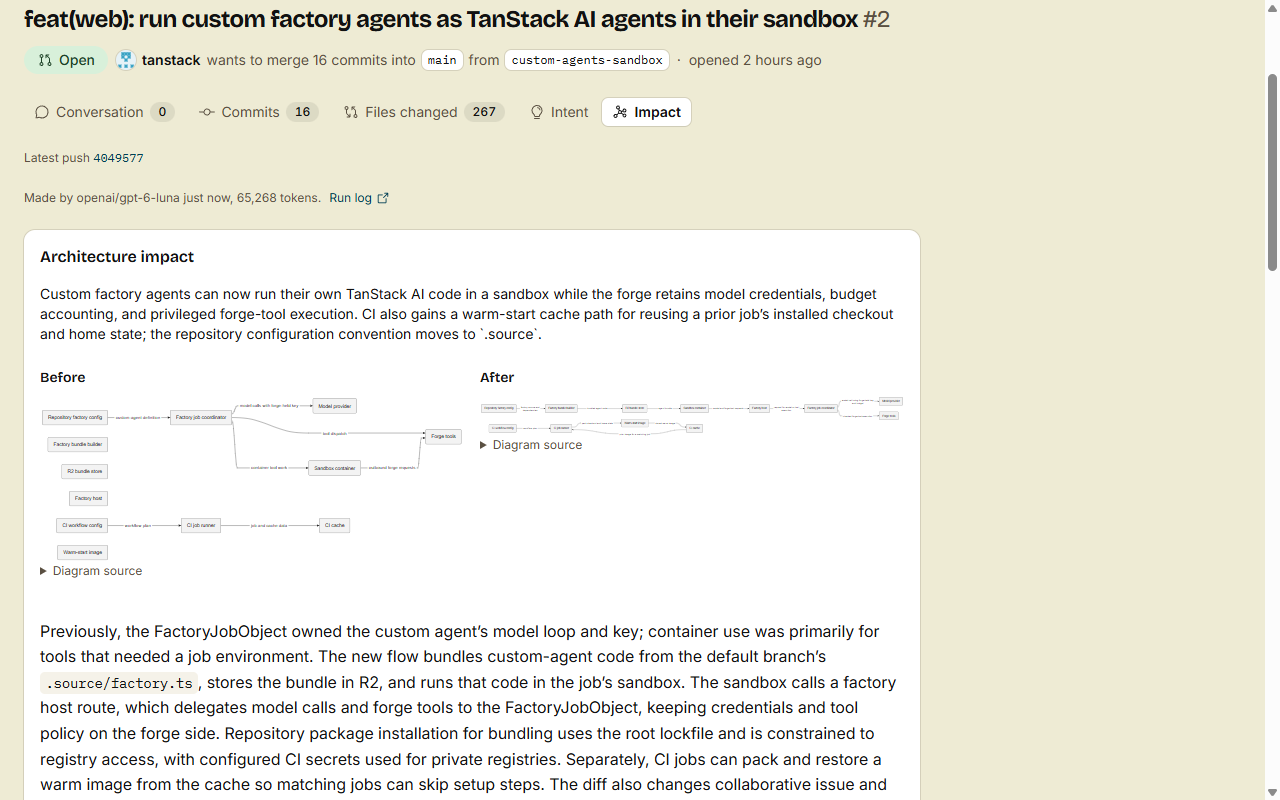
The PR impact agent answers two questions for each pull request: does it change the architecture, and does it change the public API? It is on by default.
- Open the pull request.
- Click the Impact tab, next to Intent.
- Read the parts that the pull request has.
The tab shows only the parts that apply:
- Architecture impact, for a major architecture change: a summary, a Before and an After diagram, an explanation, and the Risks.
- Public API changes, for a change that users see: what the pull request adds, removes and changes, in the groups Added, Removed and Changed. Each entry has its name, its kind and its package.
The line Latest push at the top names the head commit that the tab describes.
What the tab can say
| The tab says | Meaning |
|---|---|
| No architecture impact and no public API changes. | The pull request changes only docs, tests, generated files or assets, or the decision model said no to both questions. |
| Analyzing the impact of the latest push. | A run is queued or running. People with write access see Watch it live, which opens the run's log as the model writes it. |
| The last run failed: and a reason | The run stopped. The reason says why, for example that it used its token budget. People with write access see See its log. |
| Not analyzed yet. | The agent did not look at this head yet. For example, Who starts it does not include the author. |
| The PR impact agent is off for this repository. | An admin turned the agent off. |
| A reason, for example a daily limit | The run was skipped. The tab says why. |
When it runs
The agent looks again when the pull request opens, and on each push to it. Each push gets a new answer for its head commit.
Before a run, code and Cloudflare's decision model clef-flash decide which parts the pull request needs. A run starts only when one answer is yes.
The run gives the model the pull request, its diff and every path that it changes, in one call. The model reads no files itself. When the forge has an AI Gateway set up, the model is OpenAI's GPT-6 Luna with high reasoning. Without one, it is Workers AI's own GLM model. A finished answer names its model at the top of the tab.
Who starts it applies, as for the other agents. A run counts toward the daily limit of an author without write access. See Models, keys and triggers.
Your agent can read the same answer: src pr impact <number>, the MCP tool get_pull_impact, or GET /api/v1/repos/{owner}/{repo}/pulls/{n}/impact.
Pull requests from people without write access
- The fixer, the conflict fixer and CI self-heal start only after a clean audit of the head.
- They push to the head branch in a fork only when the author allows edits from maintainers, and the branch is not protected.
- The author starts at most 20 agent runs on the repository each UTC day. A run past the limit shows as Skipped, with the reason.
Ready to merge
When every step passed on the head, the bot posts one comment: "Ready to merge: every factory step passed on" and the short commit id. Every step passed when no run is waiting or running, and all of these are true:
- The audit of this head is
clean. - The value check is not
duplicateorout-of-scope. - The fixes-the-issue check, when it runs, is not
does-not-fix. - The review of this head is
no-findings. - The pull request has no conflicts, and the branch rules allow the merge.
Auto-merge is off by default. When an admin turns it on, the bot also merges the pull request with a merge commit. It merges only after a clean audit of that exact head commit. The merge goes through the same gate as the merge button: the branch rules, the required checks and the up-to-date rule. A push after the audit stops the merge until a new audit is clean.
Where the factory does not run
- On a pull request that screening holds, or that is closed.
- On a pull request whose author is banned. Only the spam agent runs there.
Done
You can read each step in the Factory panel, and you know which verdicts stop the pipeline. The Impact tab tells you which pull requests change the architecture or the public API. To change the modes and the triggers, see Models, keys and triggers.