Give your factory an MCP server
Your team tracks its work in Linear. You want the triage agent to find the Linear issue for a new report, and to open one when there is none. But a stranger's issue must not be able to make the agent change your Linear data.
Connect the Linear MCP server to the repository with an API key. Then pick the agents that get it, and the tools that are on.
You need admin access to the repository.
1. Open the MCP tab
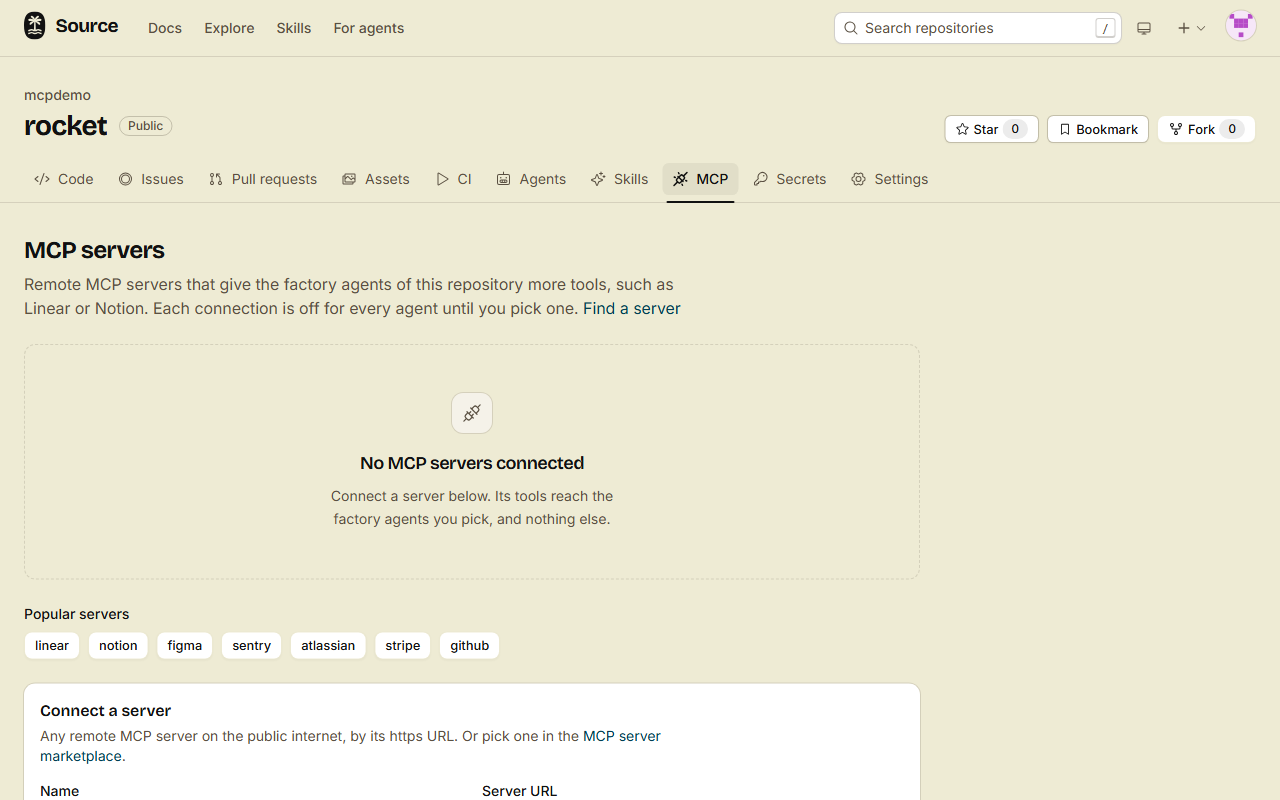
Open the repository, then the MCP tab (/<owner>/<repo>/mcp). The Connect a server form is on this page.
Under Popular servers, click linear. The form fills in the URL and the header name of the built-in Linear server. Then go to step 2 and type only the value.
For a server that is not in Popular servers, start from the marketplace:
- Click Find a server, and open the listing of the server.
- Click Connect to a repository.
- Pick the repository, then click Continue.
The MCP tab opens, with the URL and the header names of the listing filled in.
2. Connect the server
- In Name, type
linear. The agents see its tools aslinear_<tool>. - In Server URL, type the https URL of the server, for example
https://mcp.linear.app/mcp. - If the form shows Credential, select Header token.
- Under Headers, keep the header name
Authorization. In Value, typeBearerand then your Linear API key. - Click Connect.
The forge lists the tools of the server. A card for linear shows the badges Repository, Header and Connected.
The header values are stored encrypted, and no page shows them again. To change a value, connect again with the same name. The connection keeps its agents and its tools.
3. Pick the agents
A new connection is off for every agent.
- On the card, under Agents, select each agent that gets the tools, for example Triage.
- Under Tools, turn on each tool that the agents need.
- Click Save agents and tools.
Each tool has a badge. A read-only tool starts on. A tool that changes data starts off, so turn it on only when an agent must change data.
4. Know what a stranger's run gets
A run for an author without write access gets only the tools that are on and read-only. The forge applies this rule in code when it builds the tools of the run, so no text in an issue can change it.
A run for an author with write access gets every tool that is on.
5. See it in a run
Open a new issue. In the Factory panel, open the Log of the triage run.
- A Tool call entry names the tool with its connection, for example
linear_list_issues. The tool names come from the server. - A Tool result entry follows it.
- Before the first call of an MCP tool, the log shows a call of
__lazy__tool__discovery__. The model loads the tool there.
Header values are hidden in the log.
Done
The agents that you picked can call the Linear tools that are on. On the items of an author without write access, they can only read.
If a server does not answer
The run goes on without that server. The first entry of the log names the server, for example:
MCP server linear is not available: HTTP 401If the status is 401, the server refused the key. Connect again with the same name and a new key.
Click Refresh on the card to list the tools of the server again, for example after the server adds a tool. A new tool starts off unless it is read-only.
Connect once for every repository of an organization
An organization owner can connect a server for all repositories of the organization:
- Open the organization, then the MCP servers tab (
/organizations/<org>/mcp). - Connect the server, then pick the agents and the tools, as in steps 2 and 3.
Each repository of the organization then shows the connection with the badge Organization. A repository admin sees it, but cannot change it there.
To use another key or another server on one repository, a repository admin connects a server with the same name on that repository. The repository connection takes the place of the organization connection there.
From the CLI, REST or MCP
printf '%s\n' "Bearer $LINEAR_API_KEY" | src mcp connect linear --listing builtin/linear
src mcp tools linear --agent triage --enable list_issues
src mcp list
src mcp connectreads the header values from standard input, one line for each--header, in order. A value never goes into your shell history.src mcp toolstakes the tool names as the server gives them, without thelinear_prefix.--agentreplaces the agents of the connection.- Add
--org <org>to act on an organization. - REST has the same actions under
/repos/<owner>/<repo>/mcpand/orgs/<org>/mcp. MCP haslist_repo_mcp_connections,put_repo_mcp_connectionand the other*_mcp_connectiontools.
Agent tokens cannot add or change a connection. Only people connect servers.